Blog
Tutorials
How to Prompt an AI App Builder in 2026 for Better Results
Learn how to prompt an AI app builder for better results: a 6-part prompt structure, before-and-after examples, and tips for v0, Lovable, and CatDoes.

Nafis Amiri
Co-Founder of CatDoes

If you have tried an AI app builder and the result felt generic, bloated, or just wrong, the problem usually is not the tool. It is the prompt. Learning how to prompt an AI app builder is the single highest-leverage skill in this whole workflow, because the same tool produces a polished MVP or an unusable mess depending entirely on how you describe what you want. This guide uses CatDoes for the examples, but the technique works on any capable builder.
TL;DR: To prompt an AI app builder well, treat your prompt like a product brief, not a search query. Name the goal, the users, the data, the screens, the rules, and what "done" looks like. Draft it outside the builder first to save credits, then iterate one change at a time. Because CatDoes builds the full stack, screens plus database, auth, storage, and deployment, your prompt should describe the backend behavior too, not just the look. Specificity is what turns a vague guess into the app you actually pictured.
Table of Contents
Why the Prompt Matters More Than the Tool
How to Prompt an AI App Builder: The 6-Part Structure
Draft Your Prompt Outside the Builder First
Change One Thing at a Time
How to Prompt for Design Without Sounding Vague
Always Name Your States
Prompting CatDoes: Describe the Backend, Not Just the Screens
A Complete Before-and-After Example
Common Prompting Mistakes and How to Fix Them
Frequently Asked Questions
Why the Prompt Matters More Than the Tool
An AI app builder works by turning your words into product decisions. When you leave a decision out, the model does not stop and ask. It fills the gap with the most statistically average choice it can find. That is why "build a fitness app" gives you a social feed and an AI coach you never wanted: the model padded the silence with cliches.
A clear prompt does the opposite. It removes ambiguity, front-loads the product decisions that would otherwise drift, and gives the builder a definition of "done" to aim at. Independent testing of AI builders has found that specific prompts generate output 30 to 40 percent faster, with less throwaway code and fewer credits burned, because the model is not guessing and re-guessing.
So the order of operations is backwards from what most people assume. You do not pick the perfect tool and then hope. You learn to write a good brief, and CatDoes turns it into a working app, screens and backend and all.
How to Prompt an AI App Builder: The 6-Part Structure
The most reliable prompts read like a short product spec. You do not need a 2,000-word document. For most first versions, 400 to 1,200 words of structured detail beats a rambling page of stream-of-consciousness. Cover these six parts and CatDoes has almost everything it needs.
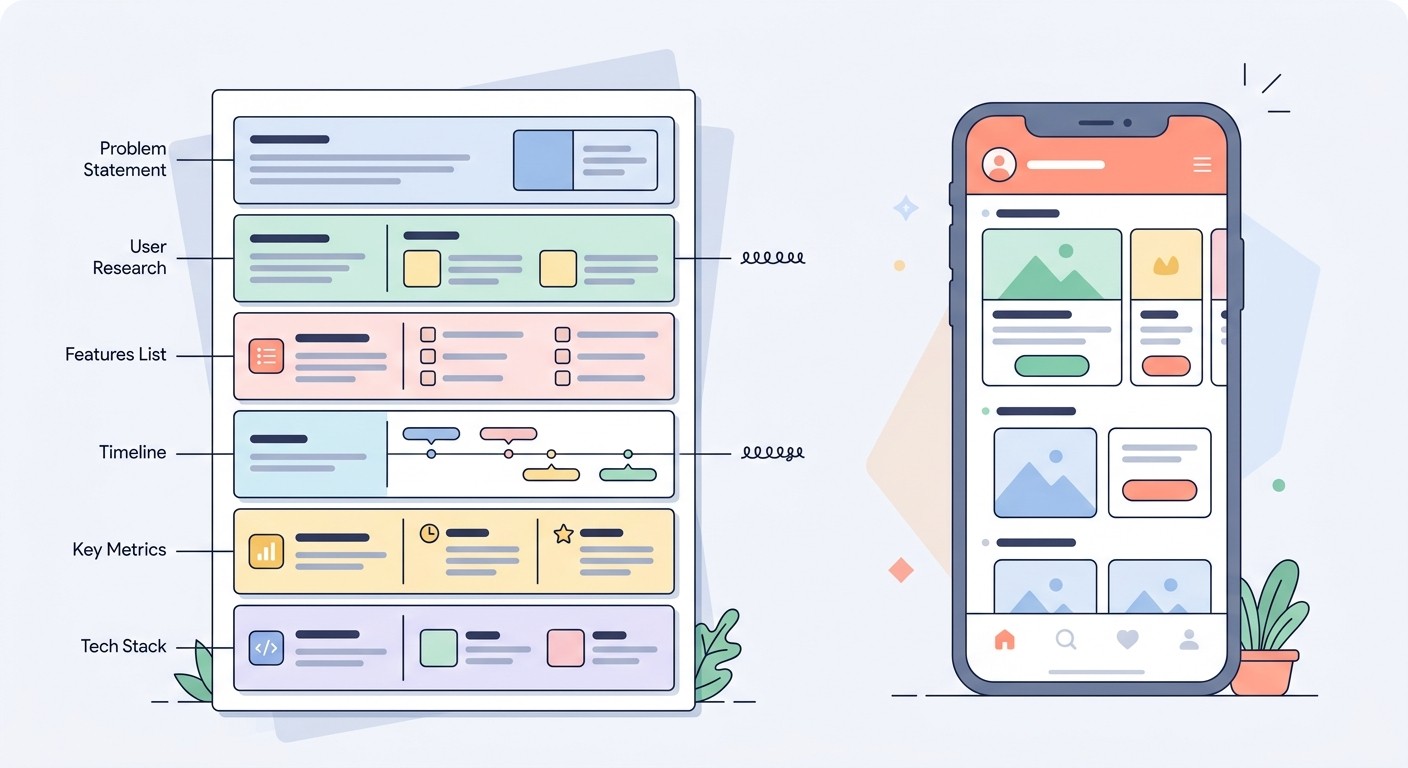
Goal and surface. One line on what the app is, plus the concrete features and screens it contains. "A personal workout logger with a home list, a workout detail screen, and a stats screen."
Users and context. Who uses it and how. A gym-goer logging sets between exercises needs big tap targets and fast entry, not a dense desktop table.
Data shape. What the app stores and how it relates. "A workout has a date and many exercises; each exercise has sets, reps, and weight."
Screens and flows. The navigation between them. "Tapping a workout opens its detail; a plus button adds a new one."
Rules and constraints. What the builder must not invent. "No social features. No login for now. Store data locally."
Acceptance tests. How you will know it worked. "I can create a workout, add three exercises, and see this week's total on the stats screen."
That last part is the one almost everyone skips, and it is the most valuable. Defining "done" turns a fuzzy request into something you can actually check the output against. Here is how the same idea looks vague versus structured.
Vague prompt | Structured prompt |
|---|---|
"Build me a workout tracker app." | "Build a personal workout logger. Screens: home (list of past workouts by date), workout detail (exercises with sets/reps/weight), stats (total workouts this week + weight-over-time chart). Data: a workout has many exercises. No social features, no accounts, store locally. Done = I can log a workout and see it on the home list." |
Result: generic app with invented features, social feed, sign-up flow you never asked for. | Result: the three screens you named, the data model you described, nothing extra. |
Draft Your Prompt Outside the Builder First
A useful mental model: think externally, build internally. Use a general assistant like Claude or ChatGPT to figure out what you want, then send the polished brief to CatDoes to make it real. The builder is where you spend credits, so you do not want to use it as a thinking pad.

This matters for cost. With most AI app builders you spend credits on every prompt, and a poorly formed prompt that needs three redos costs three times as much. Refining the wording first, then pasting a clean spec into CatDoes, gets you fewer rounds, less drift, and a smaller bill.
A fast trick when you are ready to build: end your first prompt with "Ask me any questions before you start." CatDoes plans the work before it writes anything, and this nudge surfaces the ambiguities you missed before a single screen gets built.
Change One Thing at a Time
The biggest cause of a messy, half-finished build is the follow-up prompt that asks for fifteen things at once. The agent attempts all of them, regresses something on each pass, and you lose track of what changed. Discipline beats speed here.
A reliable build sequence is foundation, then features, then polish, then deploy. Set up the core structure and sign-in first, then layer features on top, then refine the look, then ship to the App Store, Google Play, or the web. When you iterate, change one variable per prompt: add one screen, adjust one flow, or fix one bug. Keep a short running changelog so you can roll back if a change breaks something.
Two habits make single changes land cleanly. First, tell the agent what to keep: "add a phone number field below email, keep everything else the same" protects the parts you already like from being rewritten. Second, refine instead of restarting. When a result is close, "I like the layout, but make the heading bigger and use a darker background" gets you there faster than "that is not what I wanted, redo it," which throws away the 80 percent that was already right.
If you are about to make a risky change, use a checkpoint first. CatDoes saves checkpoints of your project, so you can experiment and restore an earlier version if a change goes sideways. Snapshot before you experiment, not after you regret it.
How to Prompt for Design Without Sounding Vague
Style words like "sleek," "modern," and "clean" mean nothing to a model on their own, because they have no shared definition. The fix is to pair any vibe word with a concrete instruction the builder can act on.
Instead of "make it look premium," specify the layout pattern and a simple style direction: "sidebar navigation, card-based dashboard, light theme with high contrast, generous spacing, one accent color." Naming the main colors directly helps too: "use dark blue and white as the primary colors." A short brand reference does a lot of work in a few words, like "something close to the Stripe homepage," as long as you are pointing at a feeling and not asking the agent to clone another brand outright.
Better still, upload a visual reference. CatDoes accepts mood boards, screenshots, and rough sketches, and a single image communicates more than a paragraph of adjectives ever will. If you can show the layout you have in your head, do that instead of describing it. The principle holds either way: give the builder structure and rules, not feelings. For more on this, our guide to app design best practices goes deeper on what makes an interface feel trustworthy.
Always Name Your States
AI-generated interfaces default to the happy path. They show you a screen full of data and forget what happens when there is none, when something is loading, or when a request fails. Then your real app launches, a list is empty, and it looks broken.
Name every state you care about in the prompt: empty, loading, error, and populated, plus disabled and focused for interactive elements. "When there are no workouts yet, show an empty state with a prompt to add the first one" is the difference between an app that feels finished and one that feels like a demo. Do not write "handle all the edge cases" and hope, because that produces empty states that look like error screens.
Prompting CatDoes: Describe the Backend, Not Just the Screens
Here is where CatDoes changes how you prompt. Many AI tools only generate the front end, the buttons and layouts you see. CatDoes is a full-stack agent: from the same description, it builds the app and the database, authentication, storage, and deployment behind it, with CatDoes Cloud included on every plan. That means your prompt has to carry the backend, not just the look.

In practice, add three things to the six-part structure whenever the app needs to remember anything:
What persists. Spell out the data that has to survive a refresh. "Each booking is saved with a date, customer name, and service type, and shows up the next time the user opens the app."
Who signs in. Name the auth model. "Users sign in with email; each person only sees their own bookings."
Where it ships. Tell it the target. "Deploy to iOS and Android, plus a web version on a custom domain."
Leaving the data model vague when the builder is responsible for it is the fastest way to get an app that looks right but does not actually save anything. Describe the backend behavior in plain English and CatDoes provisions the database, login, and storage to match, no schema or config files required. If you are still deciding how to approach your project, our breakdown of the best way to build an app with AI walks through the options.
A Complete Before-and-After Example
Here is the difference in practice. Imagine you want a simple book-club app where members log what they are reading, built with CatDoes.
The "before" prompt:
"Make a reading app for a book club."
The agent will guess at everything: invent a rating system, add a social feed, choose a random color scheme, and leave the data and sign-in undefined. You will spend the next hour deleting things.
The "after" prompt:
"Build a mobile app for a small book club. Users: members who want to track what they are reading and see what others picked. Screens: (1) My Shelf, a list of books I have added with title, author, and status (reading / finished / want to read); (2) Add Book, a form for title, author, and status; (3) Club Feed, a read-only list of what every member is currently reading. Data: each book belongs to a user and has title, author, status, and date added, and it should persist between sessions. Auth: members sign in with email and only edit their own shelf. Deploy: iOS, Android, and web. Rules: no ratings or comments in v1, keep it minimal. Design: light theme, card list, one accent color, big tap targets. States: show an empty My Shelf with an 'Add your first book' prompt; show a loading spinner on the feed. Done = I can sign in, add a book, and see it appear on both My Shelf and the Club Feed. Ask me any questions before you start."
The second prompt is about 150 words and it removes nearly every decision the model would have guessed wrong. It names the screens, the data, the auth, the deployment target, the constraints, the design rules, the states, and the acceptance test. That is the whole skill, applied. If you want to see the full path from idea to a shipped build, our guide on how to make an app from scratch walks through it end to end.
Common Prompting Mistakes and How to Fix Them
Mistake | Fix |
|---|---|
Vague, one-line prompt | Use the six-part structure: goal, users, data, screens, rules, acceptance test. |
Building everything in one prompt | Work in phases and change one thing at a time. |
Placeholder copy ("Lorem ipsum") | Write real content and real feature names so the layout fits reality. |
Generic style words ("make it nice") | Pair any vibe word with a concrete layout and style rule. |
Skipping empty and error states | Name each state and describe what it should show. |
Forgetting the backend | Tell CatDoes what data persists, who signs in, and where it ships. |
No checkpoint before a risky change | Save a checkpoint first, then experiment. |
One more, because it bites people after launch: AI builders will happily generate weak security defaults if you do not ask otherwise. Before you ship anything with real users, ask the agent to add basic auth rules and confirm your database is not publicly exposed, so a missing permission does not become your launch-day story.
Frequently Asked Questions
How long should a prompt for an AI app builder be?
For a first version, 400 to 1,200 words of structured detail is the sweet spot. Length is not the goal, structure is. A tight 150-word brief that names screens, data, and acceptance tests beats a rambling 500-word one. If it is unstructured, even a short prompt causes the builder to drift.
Should I write one big prompt or many small ones?
Start with one structured prompt that defines the whole app, then switch to small, single-change prompts to iterate. One change per follow-up keeps the build stable and makes it easy to undo a step that breaks something.
Do I need to specify the tech stack?
No. With CatDoes you describe the behavior you want, what persists, who signs in, where it ships, and the agent handles the underlying database, framework, and hosting. You focus on the product, not the plumbing.
Why does my AI app builder keep adding features I did not ask for?
Because your prompt left gaps and the model filled them with averages. The cure is an explicit constraints line: tell it what not to build. "No social features, no notifications, no ratings in v1" stops most of the wandering.
What is the fastest way to get better results today?
Add two sentences to your next prompt: a constraints line ("do not build X, Y, Z") and an acceptance test ("done = I can do this one thing"). Those two additions remove most of the guessing and give you something concrete to check against.
Prompt Less, Ship More
Good prompting is not a trick, it is a habit: describe the goal, the users, the data, the screens, the rules, and what done looks like, then iterate one change at a time. Do that and the tool almost disappears, you just describe the app you want and watch it take shape, front end and backend together. Start building with CatDoes and put a structured prompt to work, from the first screen to the App Store.
Nafis Amiri
Co-Founder of CatDoes


