Blog

Tutorials

Top 10 API Design Best Practices for Mobile App Teams in 2026

Discover the top 10 API design best practices for 2026. Learn versioning, security, and scalability to build robust mobile app backends with CatDoes.

Writer

Nafis Amiri

Co-Founder of CatDoes

Feb 20, 2026

Title slide with a perspective grid background displaying the text ‘Top 10 API DesignBest Practices for Mobile App Teams in 2026.

Top 10 API Design Best Practices for Mobile App Teams in 2026

In the fast-paced world of mobile app development, a robust backend is non-negotiable. The bridge between your React Native frontend and the powerful logic in the cloud is the Application Programming Interface (API). A well-designed API is the critical foundation that enables scalability, security, and a seamless user experience. Conversely, a poorly constructed API leads to bugs, performance bottlenecks, and frustrated users.

This guide provides a comprehensive roundup of the top ten API design best practices your team needs to master in 2026. We will move beyond the basics and dive into actionable strategies tailored for modern mobile application workflows. To establish a strong foundation for your API development, consider reading about these 8 Crucial API Design Best Practices for 2025 to see how fundamental principles have evolved.

Here, you will learn how to implement these advanced concepts effectively. We will explore everything from fundamental RESTful principles and versioning strategies to sophisticated authentication, security protocols, and observability. Each best practice includes practical implementation details and clear examples, demonstrating how platforms like CatDoes Cloud can simplify these complexities and accelerate your development cycle. This list is your blueprint for building a high-performing, secure, and maintainable API that serves as the backbone for your mobile app's success. By the end, you'll have a clear, actionable framework for your next project.

1. RESTful Architecture and Resource-Oriented Design

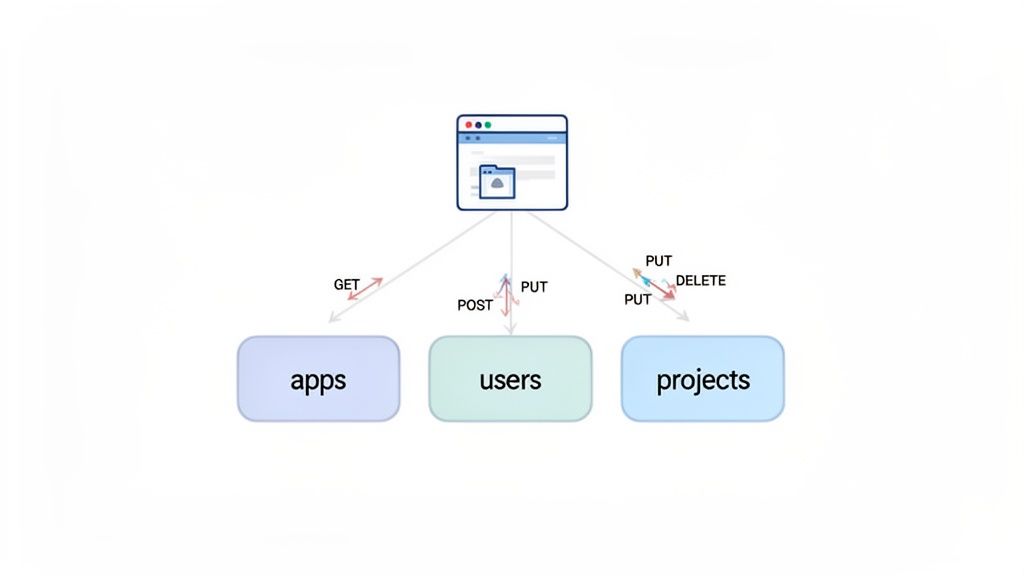
Adopting a RESTful, resource-oriented approach is a foundational API design best practice that brings predictability and scalability to your application's backend. This architectural style, first defined by Roy Fielding, treats every component of your application as a "resource." These resources, represented by nouns like users or projects, become the central focus of your API endpoints.

A diagram illustrates client-side interactions with backend services for apps, users, and projects via API methods.

The core principle is to use standard HTTP methods (verbs) to perform actions on these resources. For example, instead of creating a confusing endpoint like /createNewUser, you would use a POST request to the /users endpoint. This approach makes your API intuitive. Developers can predict how to interact with new resources without consulting the documentation for every single action.

Why It's a Best Practice

This method creates a stateless and uniform interface, which simplifies client-server interactions. A well-designed RESTful API is easier to understand, consume, and build upon. Leading platforms like Stripe and GitHub use this model to provide robust, developer-friendly APIs that handle millions of requests consistently. For mobile development, especially with frameworks like React Native, this predictability drastically reduces the complexity of state management and data fetching on the client side.

Actionable Tips for Implementation

  • Structure URLs Around Nouns: Your endpoints should represent the entities in your system. Use /projects/{projectId}/builds instead of /getProjectBuilds. This clearly defines the relationship between resources.

  • Use HTTP Methods Correctly:

    • GET: Retrieve a resource (e.g., GET /users/{userId}).

    • POST: Create a new resource (e.g., POST /users).

    • PUT/PATCH: Update an existing resource (e.g., PUT /users/{userId}).

    • DELETE: Remove a resource (e.g., DELETE /users/{userId}).

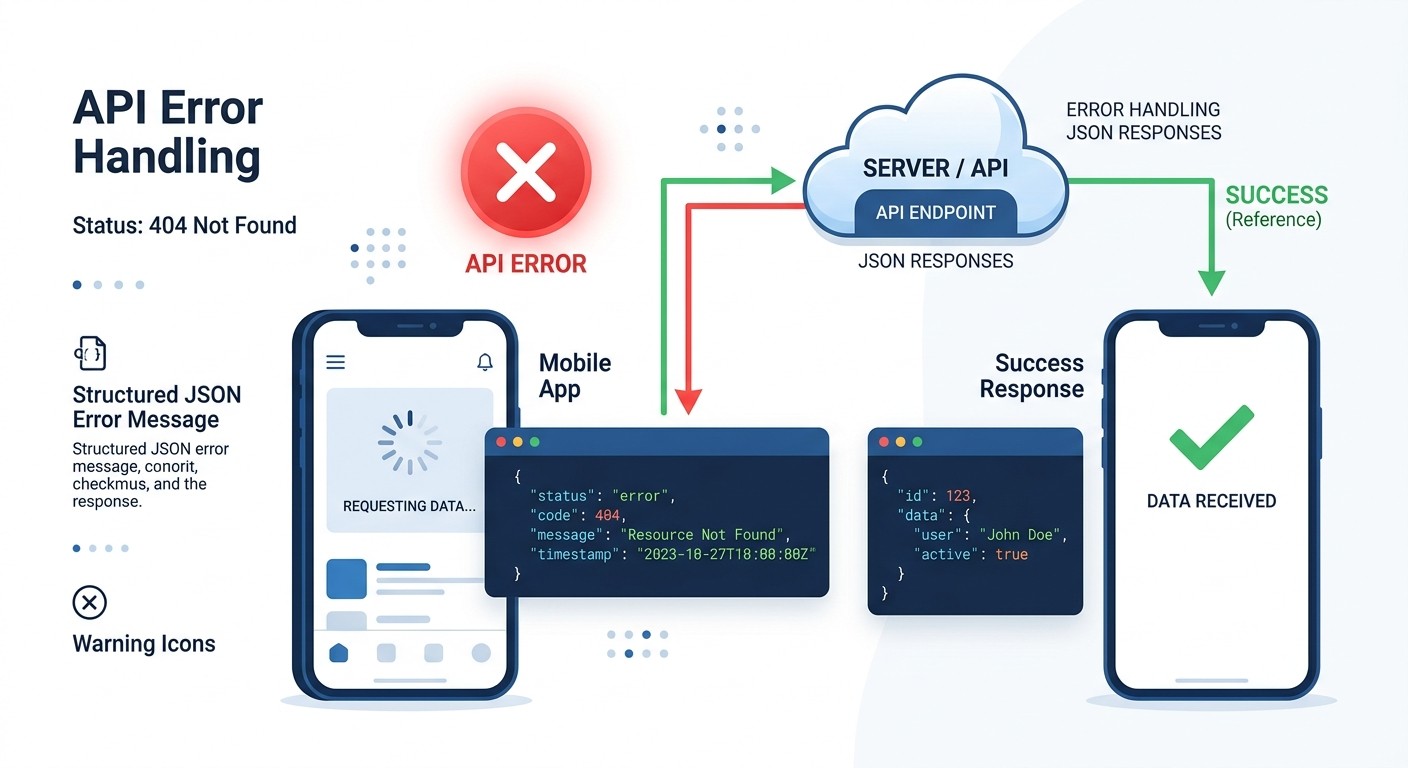
  • Leverage HTTP Status Codes: Communicate the outcome of a request clearly. Use 201 Created after a successful POST, 404 Not Found for missing resources, and 400 Bad Request for client-side errors. This standardization simplifies error handling in your mobile app.

  • Plan Your Data Structure: Before writing a single endpoint, model your resources and their relationships. A clear understanding of your data is essential. If you are starting from scratch, you can learn more about how to create a database to properly structure your application's foundation.

2. Versioning Strategy and Backward Compatibility

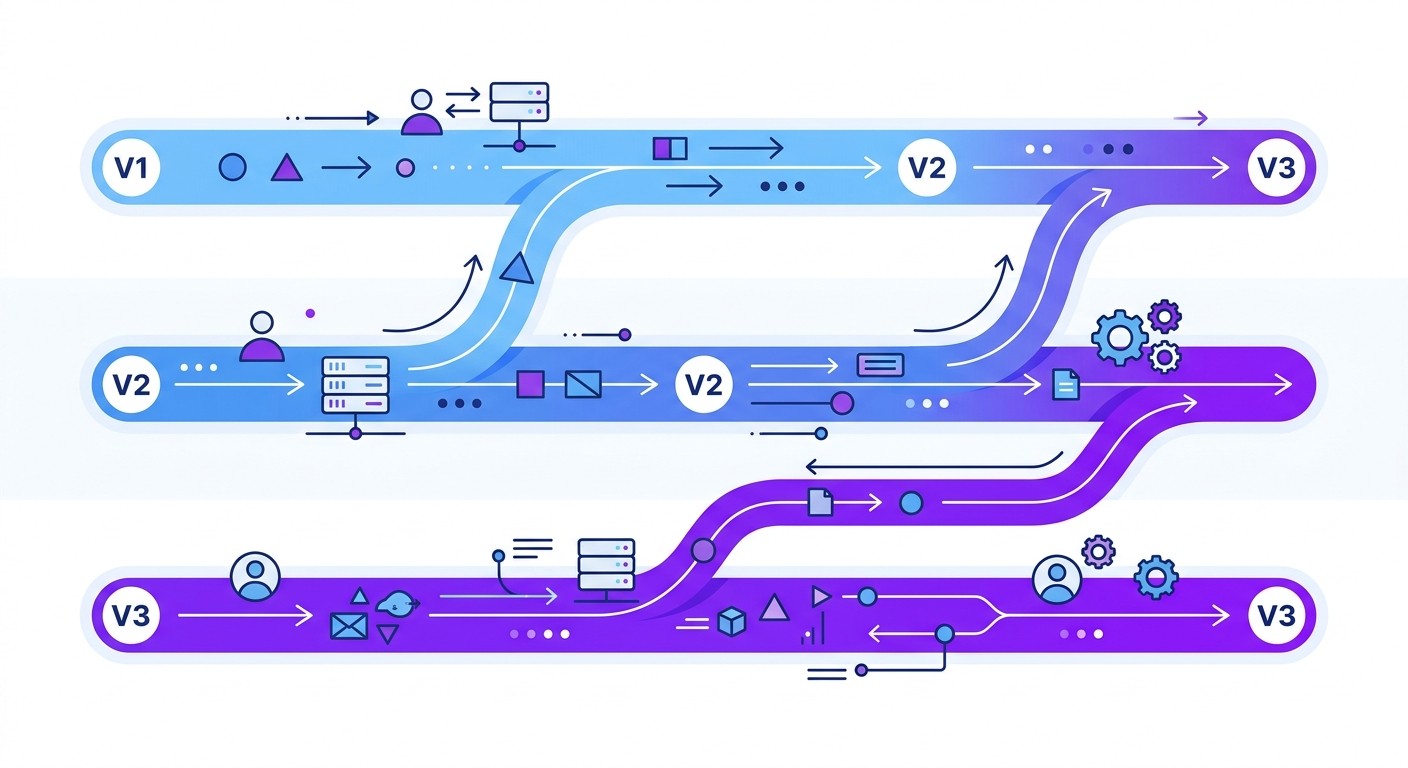
As your application evolves, its API will inevitably change. A well-defined versioning strategy is a critical API design best practice that allows you to introduce updates, add features, and fix issues without breaking existing client applications. This practice ensures that developers, especially those building mobile apps which update on a different schedule, can rely on your API's stability while having a clear path to adopt newer functionality.

The goal is to manage change gracefully. Instead of forcing all consumers to update simultaneously whenever you modify an endpoint, versioning creates parallel, stable contracts. A common approach is to include the version number directly in the URL, such as /v1/users or /v2/users. This makes the version explicit and easy for both humans and machines to understand, ensuring that requests are always routed to the correct implementation of your API logic.

Why It's a Best Practice

Without versioning, even a minor change to a data structure could crash countless mobile apps and disrupt user experience. A clear strategy provides predictability and builds trust with your developer community. Companies like Stripe and Shopify have built entire ecosystems on this trust, offering multiple API versions simultaneously with clear deprecation schedules and detailed migration guides. This stability is essential for mobile apps built with frameworks like React Native, as it prevents forced, urgent updates and allows teams to plan upgrades on their own timeline.

Actionable Tips for Implementation

  • Choose an Explicit Versioning Method: The most common and clearest method is URL-based versioning (e.g., api.example.com/v1/resource). Other options include using custom request headers (e.g., Accept: application/vnd.example.v1+json) or query parameters, but URL versioning is often the most straightforward.

  • Maintain Backward Compatibility: Whenever possible, try to make changes in a non-breaking way. Adding new, optional fields to a JSON response is generally safe. Renaming or removing existing fields is a breaking change and requires a new version.

  • Communicate Deprecation Clearly: Announce the sunsetting of an old API version at least 6 to 12 months in advance. Use deprecation headers in API responses to warn developers who are still using the outdated version.

  • Provide Comprehensive Migration Guides: Create detailed changelogs and tutorials that explain what has changed between versions. Offer code samples showing how to migrate from v1 to v2, which significantly lowers the barrier to adoption for developers.

3. Comprehensive API Documentation and OpenAPI Specifications

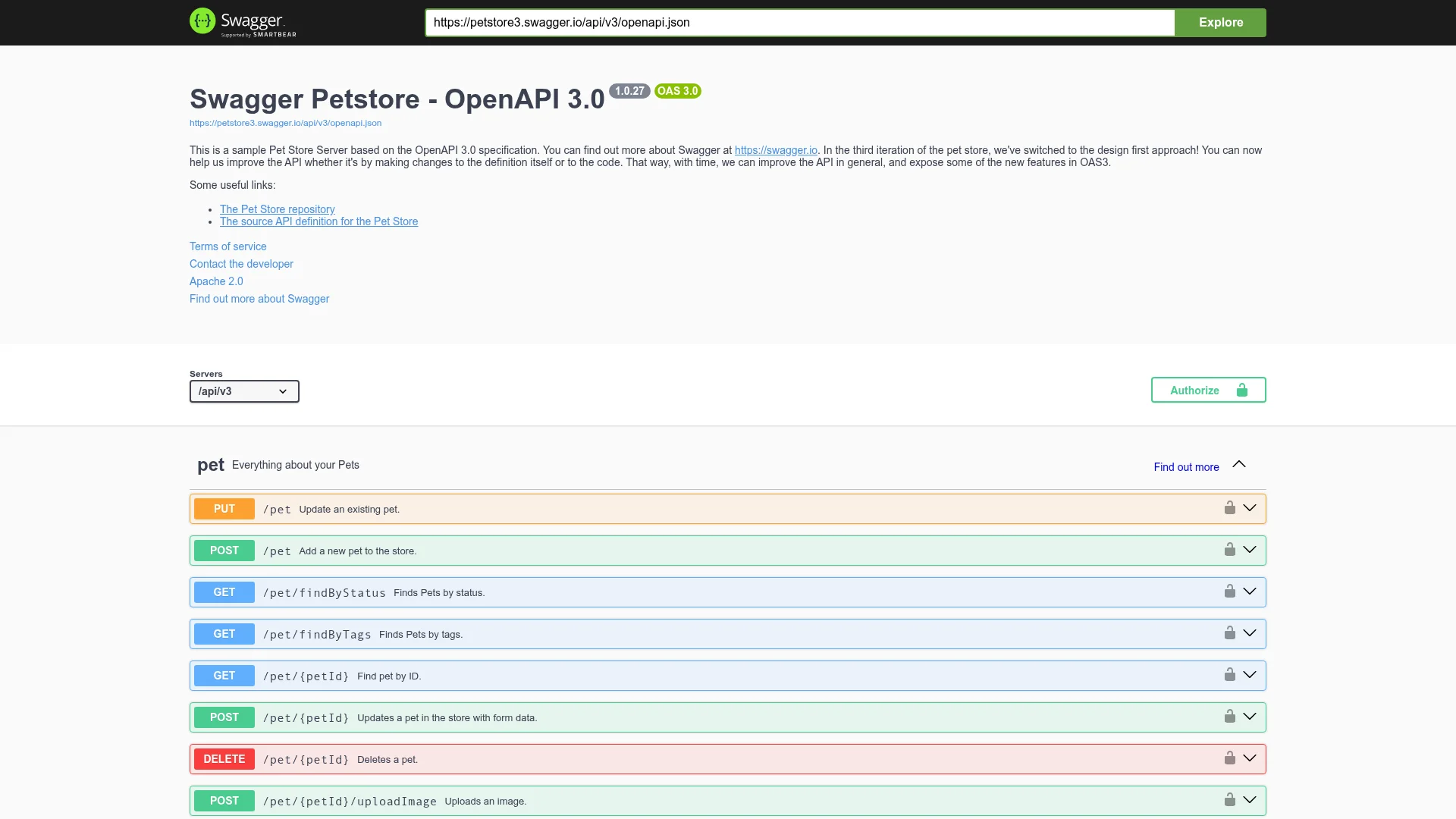
Excellent documentation is not an afterthought; it is a core feature of a well-designed API. Creating comprehensive, machine-readable documentation using a standard like the OpenAPI Specification (OAS) transforms your API from a black box into a user-friendly product. This approach allows both humans and machines to understand the capabilities of your service without needing to access source code or additional documentation.

A well-documented API significantly reduces onboarding friction for developers. Instead of guessing how to structure requests or handle responses, they can rely on clear, interactive documentation to build integrations quickly and correctly. This is one of the most critical api design best practices for fostering a healthy developer ecosystem around your product.

Why It's a Best Practice

High-quality documentation directly impacts API adoption and reduces support overhead. It serves as a single source of truth, preventing confusion and bugs caused by outdated or incorrect information. For mobile development, clear documentation on authentication flows, error codes, and payload structures is invaluable. It enables developers using frameworks like React Native to implement features faster and with fewer errors. Companies like Stripe and Twilio set the industry standard, proving that exceptional documentation is a competitive advantage.

Actionable Tips for Implementation

  • Adopt OpenAPI 3.0+: Standardize your documentation using the latest OpenAPI specification. Define clear schemas for all your resources, requests, and responses to ensure type safety and predictability.

  • Include Real-World Examples: For each endpoint, provide practical request and response examples. Show common use cases, not just the simplest "happy path" scenario.

  • Document All Error Responses: List potential HTTP status codes for each endpoint, explaining what they mean and how the client should respond. This is crucial for building resilient mobile applications.

  • Provide Code Snippets and SDKs: Offer copy-pasteable code examples in popular languages like JavaScript, Python, and Java. Better yet, use your OpenAPI specification to automatically generate client SDKs, drastically simplifying integration.

  • Create Workflow-Based Guides: Supplement your API reference with quick-start guides that walk developers through common workflows, such as "creating a new user and authenticating" or "processing a payment."

4. Authentication, Authorization, and API Security

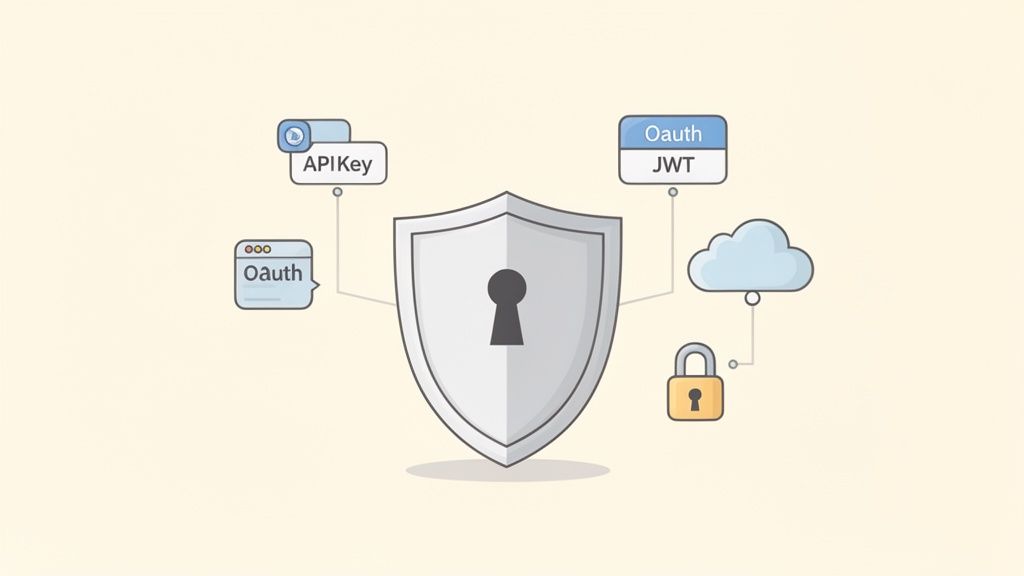
A robust security strategy is non-negotiable for any API, especially those powering mobile applications that handle sensitive user data. This involves combining strong authentication to verify identity, precise authorization to control access, and comprehensive security measures to protect data integrity. Authentication confirms who a user or system is, often using protocols like OAuth 2.0 or API keys, while authorization determines what actions they are permitted to perform.

A shield with a keyhole at its center, surrounded by elements like API Key, OAuth, JWT, a cloud, and a padlock, illustrating API security.

Implementing these concepts correctly prevents unauthorized access, protects against common vulnerabilities like those listed in the OWASP Top 10, and builds trust with your users. For platforms like CatDoes, this is critical. It enables users to securely store third-party API credentials and ensures that apps generated by the platform can authenticate and interact with backend services on behalf of users without exposing sensitive information.

Why It's a Best Practice

Effective security is the foundation of a trustworthy API. Without it, your application and user data are vulnerable to breaches, which can destroy user confidence and lead to significant financial and reputational damage. Leaders in the industry, such as Stripe and Google, have set a high bar for API security, demonstrating that robust protection is a core feature, not an afterthought. Adopting these API design best practices ensures your mobile app can securely handle everything from user logins to sensitive transactions.

Actionable Tips for Implementation

  • Enforce HTTPS Everywhere: Encrypt all data in transit by using TLS (Transport Layer Security) for every API endpoint. Never transmit credentials or tokens over an insecure connection.

  • Use Standard Authentication Protocols: Implement OAuth 2.0 for user-facing applications to delegate access securely. Provide API keys for server-to-server communication and ensure they can be easily rotated.

  • Implement Scope-Based Permissions: Grant tokens permissions (scopes) that limit access only to the resources necessary for a specific task. For example, a token might have read:profile access but not write:profile.

  • Validate and Sanitize All Inputs: Protect against injection attacks and malformed data by validating every piece of incoming data for type, length, and format. Use parameterized queries to interact with your database.

  • Set Secure HTTP Headers: Configure headers like Content-Security-Policy and X-Content-Type-Options: nosniff to mitigate cross-site scripting (XSS) and other browser-based attacks.

  • Manage Tokens Securely: Use JSON Web Tokens (JWTs) with short expiration times (e.g., 15-60 minutes) and a refresh token mechanism to re-authenticate without requiring users to log in repeatedly.

  • Log and Monitor Security Events: Keep a detailed log of all authentication attempts, successes, and failures. Monitor these logs for suspicious patterns like repeated failed logins from a single IP address. To learn more, explore these mobile app security best practices for a deeper dive into securing your application.

5. Pagination and Rate Limiting for Scalability

As your application grows, returning large datasets in a single API response becomes unsustainable. Implementing pagination and rate limiting are crucial API design best practices that ensure your service remains stable, responsive, and fair for all users. Pagination breaks down large collections of resources into smaller, manageable chunks, while rate limiting prevents abuse by restricting the number of requests a client can make in a given timeframe.

This two-pronged approach protects your backend infrastructure from being overwhelmed, whether by a legitimate high-traffic user or a malicious actor. It allows your API to scale gracefully, providing a consistent experience for everyone from hobbyist developers on a free tier to large enterprise clients. For mobile apps built with React Native, this prevents the client from having to process massive, memory-intensive payloads, leading to a faster and smoother user experience.

Why It's a Best Practice

Without these controls, a single user requesting a list with millions of records could monopolize server resources, degrading performance for all other users. APIs like those from GitHub and Twitter popularized these patterns, demonstrating how to handle massive scale while maintaining a high-quality developer experience. By communicating limits and providing clear navigation for paginated data, they build trust and enable developers to create resilient client applications.

Actionable Tips for Implementation

  • Choose the Right Pagination Strategy: For most large datasets, use cursor-based (or keyset) pagination. It's more performant than traditional offset/limit methods as it avoids slow database queries. Provide a next_cursor in the response to fetch the next page.

  • Communicate Rate Limits in Headers: Be transparent about your limits. Use standard HTTP headers to inform the client of their current status:

    • X-RateLimit-Limit: The maximum number of requests allowed in the window.

    • X-RateLimit-Remaining: The number of requests left in the current window.

    • X-RateLimit-Reset: The UTC epoch timestamp when the limit will reset.

  • Use the Link Header for Pagination: To make your API more discoverable, use the Link header (RFC 5988) to provide URLs for the next and prev pages of data. This simplifies client-side navigation logic.

  • Implement Tiered Limits: Not all users are equal. For a platform like CatDoes, you can implement different rate limits for various user tiers: a modest limit for free users (e.g., 100 requests/minute) and a much higher one for paid enterprise plans (e.g., 10,000 requests/minute).

6. Error Handling and HTTP Status Codes

Effective error handling is a critical API design best practice that separates a frustrating developer experience from a productive one. Instead of returning vague or cryptic failure messages, a well-designed API uses standard HTTP status codes and provides clear, actionable error responses in a consistent format. This allows client applications, like a React Native mobile app, to programmatically handle failures and present users with helpful guidance.

The goal is to eliminate guesswork. When a request fails, the API response should immediately clarify what went wrong, why it went wrong, and how to fix it. This approach transforms errors from dead ends into useful debugging tools, significantly accelerating development and improving the resilience of the mobile app that consumes the API.

Why It's a Best Practice

A robust error handling strategy makes an API more predictable and easier to debug. When a mobile app receives a structured error, it can parse the response to display a user-friendly message, highlight the problematic input field, or trigger a specific recovery flow. Leading platforms like Stripe and Twilio have set the standard by providing detailed error objects that include unique error codes, human-readable messages, and even links to relevant documentation, which empowers developers to resolve issues quickly without extensive support.

Actionable Tips for Implementation

  • Use Standard HTTP Status Codes: Align your responses with established conventions to communicate the nature of the error at a glance.

    • 400 Bad Request: For client-side validation errors, like a missing required field.

    • 401 Unauthorized: When authentication is required and has failed or has not yet been provided.

    • 403 Forbidden: When the authenticated user does not have permission to perform the action.

    • 404 Not Found: When the requested resource does not exist.

    • 500 Internal Server Error: For unexpected server-side problems.

  • Standardize Your Error Response Format: Always return a consistent JSON object for errors. This allows developers to build reliable error handling logic. A good structure includes a code, a message, and the specific parameter that caused the issue.

    {
      "error": {
        "code": "invalid_parameter",
        "message": "The 'email' field must be a valid email address.",
        "param": "email"
      }
    }
  • Provide Actionable Messages: Avoid generic messages like "An error occurred." Instead, offer clear guidance: "The username 'testuser' is already taken. Please choose another one."

  • Include a Request ID: Add a unique request_id to every response, both successful and failed. This allows you to easily correlate a specific API call with your server logs, making troubleshooting much faster.

7. Content Negotiation and Response Formats (JSON, XML, Protocol Buffers)

Content negotiation is the mechanism that allows an API to serve different representations of a resource at the same URI. This practice empowers clients to request the data format they can best handle, making your API more flexible and broadly compatible. The client specifies its preferred format using the Accept HTTP header, and the server responds with the data in that format, indicating the choice in the Content-Type header.

The most common format for modern APIs is JSON (JavaScript Object Notation), prized for its lightweight structure and ease of parsing in web and mobile applications. However, certain use cases might require other formats. For instance, legacy enterprise systems may depend on XML, while high-performance internal microservices might use binary formats like Protocol Buffers for maximum efficiency. Supporting multiple formats is a key aspect of robust API design best practices.

Why It's a Best Practice

Proper content negotiation future-proofs your API and expands its potential audience. By defaulting to JSON, you cater to the vast majority of modern clients, especially mobile apps built with frameworks like React Native where JSON is a native data structure. Offering alternatives like XML can be crucial for integrating with older corporate systems, while Protocol Buffers can provide a significant performance edge for internal, high-throughput services. Google’s extensive use of Protocol Buffers internally and JSON for its public APIs demonstrates this hybrid approach effectively.

Actionable Tips for Implementation

  • Default to JSON: For any new API, JSON should be the standard response format. Its simplicity, human-readability, and universal support across programming languages make it the ideal choice for most applications, particularly mobile clients.

  • Use Standard HTTP Headers: Implement content negotiation correctly by honoring the Accept header from the client. For example, a request with Accept: application/json should receive a JSON response.

  • Return the Correct Content-Type: Your API response must always include the Content-Type header to inform the client what format the data is in (e.g., Content-Type: application/json or Content-Type: application/xml).

  • Maintain Consistent Field Naming: If you support multiple formats, ensure that the data structure and field names remain consistent across them. A userId field in JSON should not become user_identifier in XML, as this creates confusion and complicates client-side logic.

8. Webhooks and Event-Driven Architecture

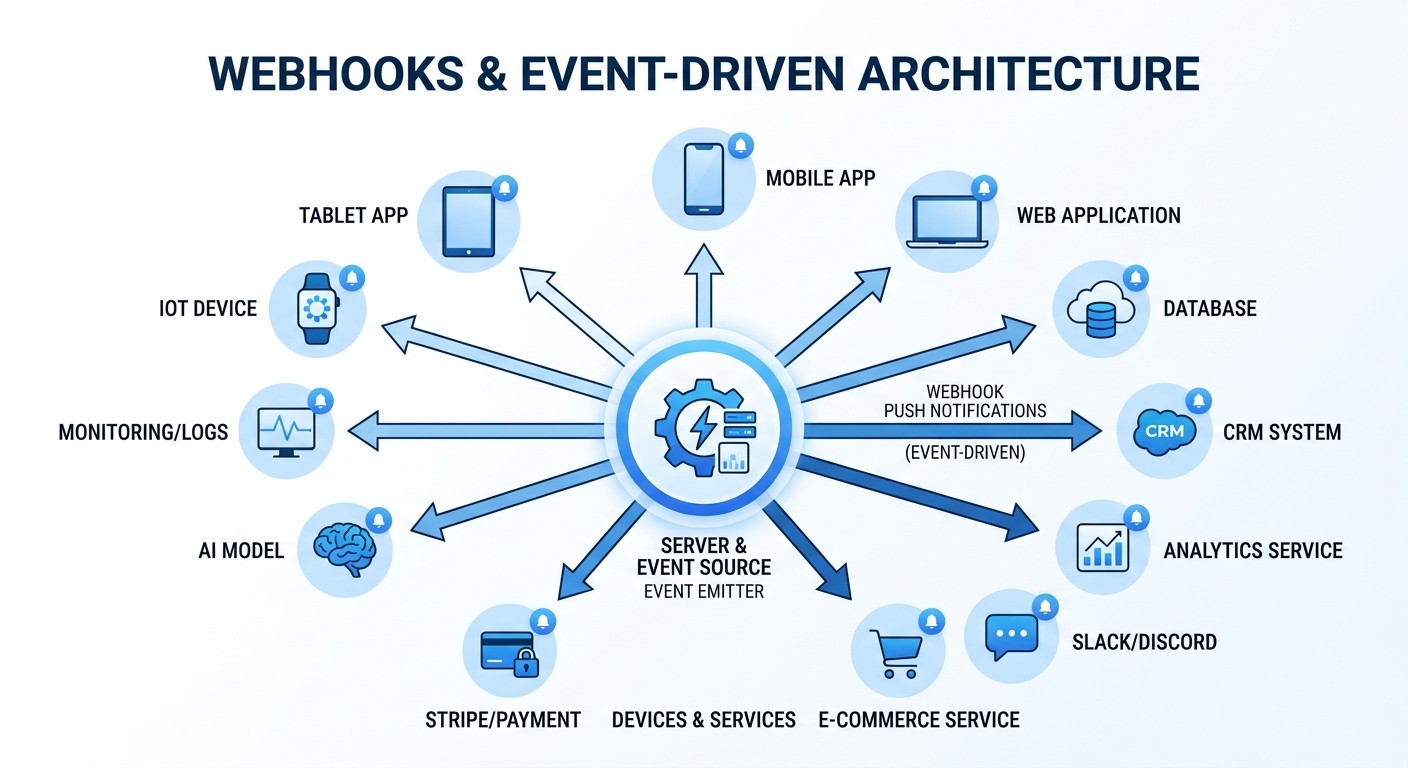
Instead of forcing clients to continuously poll your API for updates, an event-driven architecture using webhooks offers a more efficient, real-time solution. Webhooks are automated messages sent from an application when a specific event occurs. This "push" model is a core tenet of modern API design best practices, as it dramatically reduces unnecessary server load and provides immediate notifications to connected services.

When an event happens on the backend, like a successful payment or a code deployment, your API sends an HTTP POST request to a pre-configured client URL. This instantly informs the client of the change, enabling responsive, real-time user experiences. This approach is far superior to constant polling, where a client repeatedly asks, "Is there anything new yet?" which is inefficient for both the client and the server.

Why It's a Best Practice

An event-driven approach creates a decoupled, scalable system. Services can react to events without being tightly integrated, which is essential for microservices and third-party integrations. For mobile apps built with React Native, webhooks can trigger background data syncs or push notifications, ensuring the user always has the most current information without draining their device's battery with constant polling. Platforms like Stripe and GitHub have set the standard, providing robust webhook systems that power countless integrations.

Actionable Tips for Implementation

  • Secure Your Endpoints: Use HMAC signatures to verify that incoming webhooks are genuinely from your service. For example, include a Stripe-Signature header containing an HMAC-SHA256 signature that the client can verify with a secret key.

  • Ensure Idempotency: Design your webhook receiver to handle duplicate events gracefully. Include a unique event ID in every payload so the client can recognize and ignore events it has already processed.

  • Implement a Retry Strategy: Network failures happen. Implement an exponential backoff with jitter for retrying failed deliveries. This prevents overwhelming a temporarily unavailable client with rapid-fire retries.

  • Provide Developer Tooling: Offer a dashboard where developers can view webhook delivery history, see successes and failures, and manually resend events. This transparency is crucial for debugging and maintaining trust. For a platform like CatDoes, webhooks for events like deployment completion or backend errors are vital for creating a responsive development workflow.

9. API Gateway Patterns: Request/Response Transformation, Routing, and Aggregation

As your backend architecture grows, especially with microservices, managing individual services from a client application becomes complex. An API Gateway acts as a single, unified entry point for all client requests, simplifying interactions and centralizing cross-cutting concerns. It sits between the client (like a mobile app) and your backend services, handling tasks like routing, composition, and protocol translation.

Instead of your React Native app calling multiple services for authentication, user data, and project information, it makes one call to the gateway. The gateway then intelligently routes requests to the appropriate downstream services, aggregates the responses, and returns a single, cohesive payload. This pattern is fundamental to modern, scalable API design best practices, as it decouples the client from the complexities of the backend architecture.

Why It's a Best Practice

An API Gateway drastically simplifies the client-side code. Your mobile app no longer needs to know the addresses of every microservice or handle multiple authentication flows. This pattern centralizes essential functions like rate limiting, logging, caching, and security, ensuring consistent application of these policies. Leading platforms like Amazon, Kong, and NGINX have popularized this approach, demonstrating its power in managing high-traffic, distributed systems. By offloading this logic, the gateway allows backend services to focus purely on their core business functions.

Actionable Tips for Implementation

  • Centralize Cross-Cutting Concerns: Use the gateway to handle authentication, rate limiting, logging, and CORS. This prevents duplicating this logic across all your backend services.

  • Keep Transformation Logic Simple: While a gateway can transform requests and responses, keep this logic minimal. Complex business logic should reside within the backend services themselves to avoid creating a bottleneck.

  • Implement Resiliency Patterns: Use features like circuit breakers and retries at the gateway level. This helps your application gracefully handle failures in one or more downstream services without a complete system outage.

  • Aggregate Services for Efficiency: Design gateway endpoints that aggregate data from multiple microservices. This is known as the "Backend for Frontend" (BFF) pattern and can significantly reduce the number of round trips your mobile app needs to make, improving performance. You can learn more about API integration platforms to streamline this process.

10. API Testing, Monitoring, and Observability

A well-designed API is only as good as its reliability. Implementing a robust strategy for testing, monitoring, and observability ensures your API performs consistently under real-world conditions. This practice moves beyond design into operational excellence, focusing on detecting regressions, performance issues, and anomalies before they impact mobile app users.

A performance dashboard displaying test results with p95 and p99 percentiles, a timeline, and server icons.

This three-pronged approach involves automated testing to validate functionality, monitoring to track key performance indicators, and observability to understand the internal state of the system from its external outputs. This comprehensive view helps teams proactively maintain API health, a critical component of modern api design best practices.

Why It's a Best Practice

Without this foundation, an API is a black box. When a mobile app experiences slowness or errors, teams are left guessing the root cause. Companies like Google, who popularized Site Reliability Engineering (SRE), and platforms like Datadog have shown that proactive health checks are non-negotiable for scalable systems. For mobile applications, especially those built with React Native, this means faster issue resolution and a more stable user experience, preventing negative reviews and user churn.

Actionable Tips for Implementation

  • Implement a Layered Testing Strategy: Follow the testing pyramid. Focus heavily on unit tests (around 70%), followed by integration tests (20%), and a small number of end-to-end tests (10%). Use tools like Jest for unit testing your API logic.

  • Automate Testing in CI/CD: Integrate your test suites into your continuous integration and deployment pipeline. Configure your pipeline to fail the build if any tests fail, preventing regressions from reaching production.

  • Track Key Performance Metrics: Monitor essential indicators like latency (p95, p99), error rates, and throughput (requests per second). Tools like Prometheus and Grafana provide powerful, open-source solutions for collecting and visualizing these metrics.

  • Set Up Proactive Alerting: Configure alerts for anomalies in your key metrics. Use services like PagerDuty to notify your team when error rates spike or latency exceeds acceptable thresholds, enabling a rapid response.

  • Utilize Distributed Tracing: For complex microservices architectures, implement distributed tracing with tools like Jaeger or Zipkin. This allows you to follow a single request as it travels across multiple services, pinpointing bottlenecks with precision.

10-Point API Design Best Practices Comparison

Item

🔄 Implementation complexity

⚡ Resource & efficiency

⭐ Expected outcomes

Ideal use cases

💡 Key tips

RESTful Architecture and Resource-Oriented Design

Moderate, requires thoughtful resource modeling and consistent HTTP semantics

Low-Moderate, leverages existing HTTP infra and caching for efficiency

High ⭐, predictable, scalable, agent-friendly APIs

CRUD-heavy services, third‑party integrations, agent automation

Design noun-based URLs, use proper status codes, implement pagination, version early

Versioning Strategy and Backward Compatibility

High, managing multiple versions and deprecation policies adds operational overhead

Moderate, extra docs, migration tooling, and support processes

High ⭐, safe evolution, reduced breaking changes, developer trust

Public APIs with many long-lived clients and evolving features

Announce deprecation early, provide migration guides, include version warnings in responses

Comprehensive API Documentation and OpenAPI Specifications

Low-Moderate, writing and maintaining machine-readable specs requires discipline

Low, tooling automates SDKs/tests; hosting interactive docs is inexpensive

High ⭐, faster onboarding, automation (SDKs/tests), better discoverability

APIs used by third parties, automation tools and AI agents

Use OpenAPI 3+, include real examples, generate SDKs, keep docs versioned with API

Authentication, Authorization, and API Security

High, complex flows (OAuth, JWT) and ongoing security maintenance required

High, auth infra, key rotation, monitoring, and encryption add cost

Very High ⭐, protects data and enables trusted integrations

Any API handling sensitive data or third‑party access

Enforce HTTPS, use OAuth for delegation, rotate keys, implement least privilege and logging

Pagination and Rate Limiting for Scalability

Moderate, cursor/keyset pagination and adaptive rate limits need careful design

Moderate, rate limit services and pagination state management required

High ⭐, predictable scaling, fair usage, improved performance

Large datasets, multi-tenant platforms, public APIs

Prefer cursor/keyset for large datasets, expose rate-limit headers, implement backoff with jitter

Error Handling and HTTP Status Codes

Low-Moderate, consistent formats and error codes require coordination

Low, needs standardized responses and logging; minimal infra cost

High ⭐, clearer troubleshooting, better automation, reduced support load

APIs consumed by humans and agents needing actionable errors

Standardize JSON error schema, include request_id, provide remediation steps

Content Negotiation and Response Formats (JSON, XML, Protobuf)

Low-Moderate, format translation and negotiation logic is straightforward but needs consistency

Low-Moderate, supporting multiple formats increases implementation and client support cost

Medium ⭐, flexible client support; performance gains for binary formats

Legacy integrations, performance‑sensitive clients, gRPC bridges

Default to JSON, honor Accept header, keep field names consistent across formats

Webhooks and Event-Driven Architecture

High, reliable delivery, retries, idempotency, and ordering add significant complexity

Moderate-High, delivery infrastructure, retry queues, dashboards, and security checks required

High ⭐, real‑time updates, reduced polling, better responsiveness

Real‑time notifications, integrations requiring immediacy (deployments, payments)

Use HMAC signatures, ensure idempotency, include timestamps, provide delivery dashboard and DLQ

API Gateway Patterns: Transformation, Routing, Aggregation

Moderate-High, gateway config and transform logic can grow complex

Moderate, gateway infrastructure centralizes cross‑cutting concerns but adds latency

High ⭐, centralized auth, caching, aggregation, simpler client surface

Microservices ecosystems and multi-backend platforms

Keep transforms simple, implement circuit breakers, cache at gateway, log but avoid sensitive data

API Testing, Monitoring, and Observability

Moderate-High, comprehensive test suites and tracing require setup and maintenance

High, monitoring, storage for metrics/logs/traces, and alerting systems consume resources

Very High ⭐, faster detection, fewer regressions, data-driven ops

Production systems, CI/CD pipelines, platforms with many integrations

Automate tests in CI, track p50/p95/p99, use distributed tracing, tune alerts to avoid noise

Build Better APIs, Build Better Apps

The journey through the landscape of API design best practices reveals a fundamental truth: a well-designed API is the bedrock of any successful mobile application. It is not merely a technical implementation detail; it is the central nervous system that connects your users' experience on their devices to the powerful logic and data residing on your servers. Moving beyond basic endpoint creation to embrace these advanced principles is what separates fragile, difficult-to-maintain apps from scalable, secure, and delightful digital products.

Throughout this guide, we have explored the critical pillars that uphold a robust API architecture. We started with the foundation of RESTful principles and resource-oriented design, establishing a logical and predictable structure. We then addressed the inevitable reality of evolution with strategic versioning, ensuring your application can grow without breaking existing functionality for your loyal user base. The importance of clear communication was highlighted through the necessity of comprehensive documentation using standards like the OpenAPI Specification, which serves as a contract between your frontend and backend teams.

From Theory to Tangible Results

Mastering these concepts transforms abstract goals into tangible business outcomes. A commitment to strong API design best practices directly impacts your development lifecycle and your app's long-term viability.

  • Enhanced Security: Implementing robust authentication and authorization patterns, as we discussed, is non-negotiable. It protects user data, prevents unauthorized access, and builds the trust essential for user retention.

  • Superior Performance and Scalability: Thoughtful pagination and rate limiting are not just about preventing abuse; they are about guaranteeing a snappy, responsive user experience, even as your user base grows from hundreds to millions. A well-designed API can handle traffic spikes without crumbling.

  • Improved Developer Experience: When developers have clear documentation, consistent error handling, and predictable resource models, they can build features faster and with fewer bugs. This accelerates your time to market and reduces development costs.

  • Future-Proof Architecture: By incorporating patterns like webhooks for event-driven actions and leveraging an API Gateway, you create a flexible system that can easily integrate with third-party services and adapt to future requirements.

Embracing these practices is an investment in your application's future. It’s about building a resilient, adaptable, and secure foundation that empowers you to innovate rather than constantly fix underlying architectural problems.

Your Actionable Path Forward

The path to API mastery is a continuous one, but you can start making a significant impact today. Begin by auditing your current or planned API against the principles outlined here. Are your error messages informative? Is your versioning strategy clear? Is your documentation accessible and automatically generated?

Prioritize the areas that will provide the most immediate value. For a new mobile MVP, this might mean perfecting your resource model and authentication flows. For an established application, perhaps the focus should be on implementing better monitoring and observability to proactively identify issues before they affect your users. Remember, the goal is not to implement every single practice overnight, but to cultivate a team culture that values high-quality API design as a core competency. By consistently applying these api design best practices, you create a powerful flywheel effect, where each new feature is built upon a stronger, more reliable foundation. This approach is the key to building not just functional apps, but truly exceptional ones.

Ready to build a production-ready mobile app without getting bogged down in backend complexities? CatDoes integrates these API design best practices into its core, providing a managed cloud backend and AI agents that build your React Native app for you. Turn your idea into a scalable, secure, and well-architected application today by visiting CatDoes.

Writer

Nafis Amiri

Co-Founder of CatDoes