Blog
Tutorials
What is serverless architecture? A Clear Guide to Scalable, Cost-Efficient Apps
What is serverless architecture? A quick answer: what is serverless architecture and how it powers scalable apps, cuts costs, and speeds development.

Nafis Amiri
Co-Founder of CatDoes
Serverless architecture isn’t about getting rid of servers; it’s about getting rid of the headache of managing them. It’s a way to build and run applications where the cloud provider handles all the underlying infrastructure for you.
Instead of guessing your capacity needs, provisioning servers, and patching them, you just focus on your code. You only pay for the exact resources your application uses, down to the millisecond.
The Shift From Owning to Renting Computing Power
To really get what serverless is all about, think about starting a food business.
The old way is like leasing a full restaurant. You pay rent, buy all the kitchen gear, hire a full-time staff, and keep the lights on 24/7. It doesn't matter if you have one customer or a hundred; your costs are mostly fixed. This is exactly like running a traditional server. You pay for it to be on, whether it's busy or sitting completely idle.
Serverless, on the other hand, is like using a modern ghost kitchen. You only show up when an order comes in. You use their professional-grade stoves and tools to cook the meal, and you pay only for the time you were actually cooking. The moment the food is done, you’re out, and the costs stop. The kitchen owner handles all the maintenance, security, and cleanup.
That’s the core idea. You write your code in small, independent pieces called functions. When something happens, like a user tapping a button in your app, the cloud provider instantly spins up the resources to run your function, executes the code, and shuts it all down. You never touch a server.
A New Model for Application Development
This approach completely changes how developers build apps. The focus moves away from managing infrastructure and shifts entirely to writing great business logic. Since its rise to prominence with the launch of AWS Lambda in 2014, the serverless model has exploded in popularity.
Serverless architecture liberates developers from server management, letting cloud providers like AWS Lambda, Azure Functions, and Google Cloud Functions handle all the infrastructure automatically. This pay-per-use model can drastically cut costs, with businesses often reducing their bills by 70-90% compared to traditional servers because they only pay for actual compute time. You can explore more about the growth of serverless adoption in recent market trend reports.
This incredible cost efficiency is one of the biggest reasons for its adoption, especially for startups and apps with unpredictable traffic. Why pay for a server to sit idle when you can pay only for the split seconds it takes to process a request?
Serverless vs. Traditional Server Architecture
To make the difference crystal clear, let's put the two models side-by-side. The contrast in who does the work, how you pay, and how you scale really highlights why serverless has become such a game-changer for modern applications.
Aspect | Traditional Architecture | Serverless Architecture |
|---|---|---|
Server Management | You are responsible for provisioning, patching, and maintaining servers. | The cloud provider manages all server infrastructure for you. |
Cost Model | Pay for running servers 24/7, even when they are idle. | Pay-per-use; you only pay when your code is actively running. |
Scalability | Manual or complex auto-scaling configurations are required. | Automatically scales up or down based on demand, instantly. |
Developer Focus | Divided between application code and infrastructure management. | Focused almost entirely on writing and deploying application code. |
Ultimately, the choice comes down to control versus convenience. Traditional servers give you total control over the environment, while serverless offers unparalleled ease of use and cost efficiency by abstracting away the hardware.
How Serverless Computing Actually Works
To really get what serverless architecture is all about, you have to look past the name and dig into the mechanics. The engine driving this whole model is a concept called Function-as-a-Service, or FaaS. Instead of one big, monolithic application running 24/7 on a server, your backend gets broken down into tiny, independent bits of code called functions.
Each function has one specific job: processing a payment, resizing an image, sending a push notification. They sit dormant, costing you nothing, until something calls them into action. And that "something" is what we call an event.
An event can be almost anything you can imagine: a user tapping a button in your app, a new file landing in cloud storage, or even just a scheduled time of day. This event-driven approach is what makes serverless so incredibly efficient and responsive.
The Event-Driven Workflow in Action
The whole thing is a seamless, automated chain reaction that kicks off and finishes in milliseconds. When a trigger event happens, the cloud platform instantly finds an available server, runs your function's code, and then shuts it all down. You don't manage any of it.
Let's walk through a classic mobile app example: a user uploading a new profile picture.
Event Source Trigger: The user picks a photo and hits "upload." That action sends the image file to a cloud storage service like Amazon S3, which immediately creates an "object created" event.
Function Invocation: The cloud platform is listening. It sees this specific event and automatically triggers the function you’ve designated for handling image processing.
Code Execution: The function wakes up and runs its code. It might generate a thumbnail, apply a filter, and then pop the new image URL into the user's profile in a database.
Resource Deactivation: As soon as the function’s job is done, it shuts down. The resources are released, and you stop paying for them instantly.
This entire sequence happens without anyone lifting a finger. If 10,000 users upload a photo at the same time, the cloud provider simply spins up and runs that same function 10,000 times in parallel. This automatic, built-in scaling is the secret sauce of how serverless works.
This diagram shows just how different the flow is compared to a traditional, server-based setup.
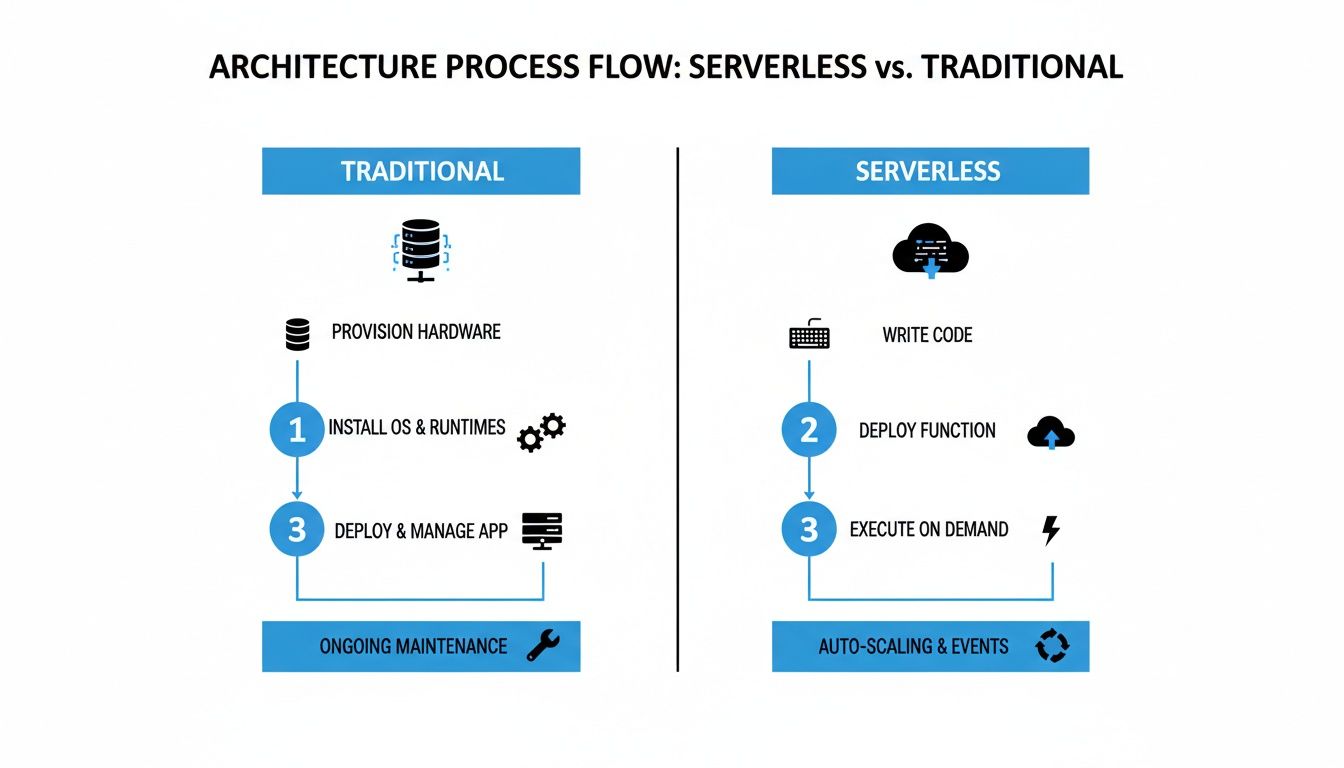
You can see the direct, event-to-function path in serverless, which cuts out the constant management loop required for traditional servers.
Understanding Stateless Functions
A core principle you have to grasp is that serverless functions are stateless. This means every single time a function runs, it’s in a brand-new, clean environment. It has zero memory of any previous times it ran.
This might sound like a drawback, but it's actually a brilliant design feature. Because functions don't hang onto data between runs, they can be scaled up, down, or replaced without causing weird side effects. For anything that needs to stick around, like user data, functions simply connect to an external service.
A serverless function is like a specialist consultant you hire for a single task. The consultant arrives with their own tools, completes the job based only on the information you provide, delivers the result, and leaves. They don't keep an office at your company or remember the details of their last visit.
This forces a shift in how you think about building software. Instead of one big, stateful application, you’re composing a backend from many small, stateless functions that talk to each other through databases, caches, and storage. The result is an architecture that’s not only highly scalable but also incredibly resilient. If you want to see how this fits into a modern deployment pipeline, check out our guide on continuous deployment best practices.
What Are the Real Benefits of Building an App with Serverless?
Deciding to go serverless isn't just a technical tweak; it's a strategic move that directly impacts your budget, your team's speed, and your app's ability to grow. When you hand off the messy parts of infrastructure management to a cloud provider, you unlock some serious advantages. It lets you and your team stop worrying about servers and focus on what actually matters: building a great product.
The upsides go way beyond just code. They touch every part of launching and scaling a mobile app.
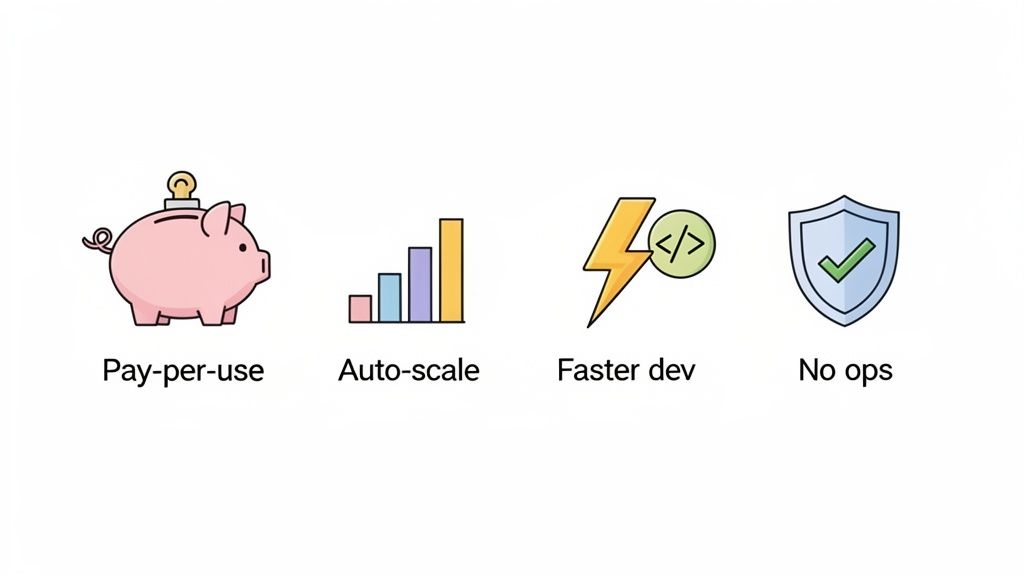
Dramatic Cost Savings Through Pay-Per-Use
The most obvious and compelling win with serverless is the cost model. With traditional servers, you’re paying for capacity 24/7, whether or not a single person is using your app. It’s like leaving the lights on in an empty office building all night, a total waste of money.
Serverless completely flips this script. You only pay for the precise compute resources your app uses while it's running, often billed down to the millisecond. When your code isn't executing, your cost drops to zero. This pay-per-use approach can lead to huge savings, particularly for new apps or services with unpredictable traffic.
This efficiency is why serverless has taken off. Businesses often see their infrastructure expenses cut by 70-90% because they're no longer paying for idle time.
Effortless and Instant Scaling
Picture this: your app gets a surprise feature on a popular blog, and traffic explodes overnight. With a traditional server, that sudden spike would almost certainly crash your system unless you had manually over-provisioned capacity "just in case." You'd be scrambling to add more servers while bleeding potential new users.
Serverless makes this entire class of problems disappear. Scaling isn't something you have to configure; it's just how the architecture works.
If ten users hit your app at once, the cloud provider simply runs your function ten times in parallel. If ten thousand users show up, it runs the function ten thousand times. This happens automatically and instantly, with zero manual intervention.
This built-in elasticity means you're always ready for both the quiet moments and massive traffic surges. You never have to worry about your infrastructure keeping up with your success. For a deeper dive, there are great resources that explore serverless architectures for scalability in more detail.
Accelerated Development and Innovation
When your engineers aren't bogged down with patching servers, configuring networks, and planning for capacity, they can pour all that time and energy into building features that matter to your customers. Serverless abstracts away the underlying complexity, letting developers just write and deploy code.
This streamlined workflow radically shortens the development cycle. Instead of wasting weeks on server setup, a developer can get a new API endpoint live in a few hours. This speed translates directly to a competitive advantage, allowing for faster iteration, quicker feedback, and a much shorter path from an idea to a working product.
Faster Time-to-Market: Launch new features and entire apps in a fraction of the time.
Increased Productivity: Developers spend their days coding, not managing infrastructure.
Focus on Business Logic: Your team can concentrate on solving user problems instead of operational chores.
Freedom From Operational Overhead
Finally, and perhaps most importantly, serverless frees you from the relentless grind of server management. This hidden "tax" on development teams is a long list of thankless but critical tasks that add zero direct value to your app.
With a serverless approach, the cloud provider handles all of it for you:
Server Provisioning: No more guessing what server size or type you need.
OS Patching: Security updates are applied automatically in the background.
System Monitoring: The platform manages the health of the underlying hardware.
Capacity Planning: Forget about trying to predict next quarter's traffic.
By offloading these responsibilities, you dramatically reduce operational complexity and minimize the risk of human error. This lets even a small team or a solo founder build a robust, secure, and highly available application that would have once required a dedicated operations team to maintain.
To put these benefits in context, let's look at how they move the needle on key business goals.
Impact of Serverless on Key Business Metrics
This table quantifies the typical improvements businesses see after adopting a serverless model for their applications.
Business Metric | Traditional Server Impact | Serverless Architecture Impact |
|---|---|---|
Time-to-Market | Months to a year. Requires extensive planning, provisioning, and configuration before coding begins. | Days to weeks. Developers can deploy code almost immediately, drastically shortening launch cycles. |
Infrastructure Costs | High and fixed. Pay for reserved capacity 24/7, even when idle, leading to significant waste. | Low and variable. Pay only for what you use, often reducing costs by 70-90% for spiky workloads. |
Operational Staffing | Requires dedicated DevOps/Ops team for maintenance, patching, and scaling. | Minimal Ops overhead. Cloud provider manages the infrastructure, freeing up engineering resources. |
Scalability | Manual and slow. Scaling requires manual intervention or complex auto-scaling configurations that are slow to react. | Automatic and instant. Scales to millions of users seamlessly and automatically without any configuration. |
Developer Productivity | Low. Engineers spend significant time on boilerplate infrastructure tasks instead of building features. | High. Engineers focus entirely on application logic, leading to faster feature delivery and innovation. |
The data is clear: serverless doesn't just change how you deploy code. It fundamentally alters the economics and speed of building and running a modern application.
When Should You Go Serverless?
Picking a serverless architecture is a big decision, but it's not a silver bullet for every app. You have to know its sweet spots. Serverless really comes alive in situations where its main perks, cost savings, automatic scaling, and super-fast development, line up perfectly with what you’re trying to build.
Figuring out if it’s the right move means looking at your app’s traffic, your development timeline, and how you want to manage operations. For a ton of modern mobile and web apps, the benefits are obvious right out of the gate. But it’s just as important to spot the times when a more traditional server setup might be the smarter play.
Scenarios Where Serverless Is a No-Brainer
Serverless is a perfect match for apps with sporadic or unpredictable traffic. Why? Because you only pay for the moments your code is actually running, which completely gets rid of the cost of idle servers just sitting there waiting.
Let’s look at where it really shines.
Building a Minimum Viable Product (MVP): Speed is everything when you're launching a new idea. Serverless lets you build and ship a working backend in a fraction of the time, so you can test your concept with real users without a massive upfront investment in servers.
Apps with Unpredictable Traffic: Imagine an app for selling concert tickets. It might see almost no activity for weeks, then get slammed with a massive traffic spike the minute tickets go on sale. A serverless backend scales instantly to handle that rush and then scales right back down to zero. You never pay for capacity you aren't using.
Real-Time Data Processing: Serverless functions are brilliant for event-driven tasks. For example, a function can trigger every time a new photo is uploaded to storage, automatically resizing it into different thumbnail sizes without a dedicated server waiting around for the next job.
Modern Microservices: It's common practice to break down big applications into smaller, independent services. Serverless functions are the ultimate microservice. They're tiny, do one thing well, and can be developed, deployed, and scaled completely on their own.
Serverless architecture is the default choice for agility. It allows teams to move quickly, experiment with new ideas, and scale effortlessly from the first user to the millionth, all while keeping infrastructure costs directly proportional to usage.
This flexibility is what makes it such a great foundation for startups and innovative projects where the future is anyone’s guess, but the need to move fast is a constant. If you want to see how this stacks up against other managed backend options, you can dive deeper in our guide on what Backend-as-a-Service is.
When Serverless Might Not Be the Best Fit
For all its strengths, there are times when serverless just isn't the right tool for the job. Knowing these situations can help you avoid performance headaches or needless complexity down the road. Sometimes, a different architecture is simply a better fit.
For example, applications with extremely consistent, high-volume traffic running 24/7 might actually find a dedicated server model more cost-effective in the long run. Once you hit a certain threshold of constant use, paying a flat rate for provisioned servers can become cheaper than paying for billions of individual function calls.
You should also think twice about serverless in these cases:
Long-Running Processes: Most serverless platforms cap how long a single function can run, usually at around 15 minutes. For heavy-duty tasks like massive data migrations or complex scientific simulations that need hours to complete, you're better off with a container or a virtual machine.
Deep Operating System Control: If your app needs special OS-level tweaks, custom libraries, or direct access to the hardware, serverless is not for you. The whole point of the model is to abstract all of that away so you don't have to think about it.
In the end, it all comes down to what you need. For the vast majority of mobile apps, internal tools, and startups, the pros of serverless easily outweigh the cons. It gives you a path to build scalable, resilient apps with incredible speed and cost efficiency.
The Core Components of a Serverless Backend
To really get what serverless architecture is, you have to look at its building blocks. A serverless backend isn't one single piece of technology; it’s a collection of specialized, managed services that you stitch together. By combining these parts, you can build a powerful, scalable, and resilient application backend without ever logging into a server.
Let's break down the three essential pillars that hold up any modern serverless backend. These components handle everything from your app's logic to its data storage and user management.
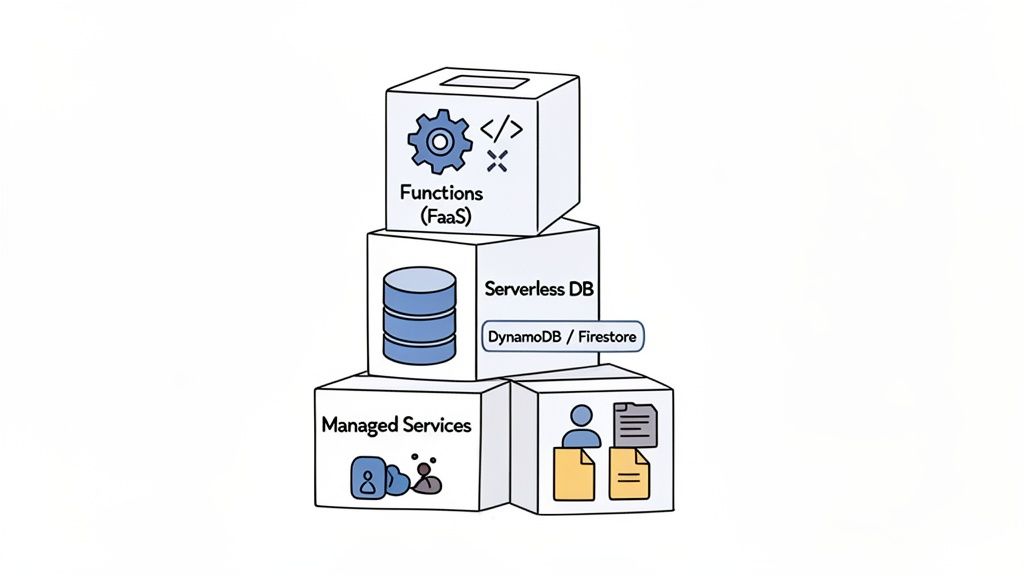
Serverless Functions: The Brains of the Operation
At the very heart of any serverless setup are Functions-as-a-Service (FaaS). These are small, independent chunks of code that run in response to specific triggers or events. Think of them as the brain of your application, containing all the business logic that makes your app actually do things.
When a user signs up, a function can create their profile. When they make a purchase, another function can process the payment. Each function is stateless, meaning it spins up in a fresh environment every single time and only knows about the data it’s given for that one specific job.
This whole idea was kicked into high gear by AWS Lambda when it launched back in November 2014, marking the first time FaaS was widely available. It was a massive shift because it decoupled code from infrastructure, directly tackling the huge inefficiency of traditional models where idle servers often wasted 70-80% of their capacity. The evolution of the serverless market since then has been incredible.
Serverless Databases: For Effortless Data Storage
Your app needs a place to stash data: user profiles, product info, in-app messages, you name it. In a serverless world, you lean on a serverless database that automatically grows with your app's demands. Services like Amazon DynamoDB or Google Firestore are popular choices here.
These databases give you a few huge advantages:
No Administration: You're not managing database servers, patching software, or worrying about backups. It's all handled for you.
Automatic Scaling: The database instantly scales its capacity up or down based on your app's traffic, so performance never takes a hit.
Pay-Per-Use: Just like with functions, you only pay for the read and write operations you actually use, not for a database server sitting idle.
This approach lets you focus entirely on your data model and app features, offloading the tedious (and complex) job of database management to the cloud provider.
Managed Services: For Common Backend Tasks
Beyond functions and databases, a complete backend needs to handle other critical jobs like user authentication, file storage, and API management. Instead of building these complex systems from the ground up, serverless architectures rely on managed services. You simply integrate pre-built, fully managed solutions.
Managed services are like hiring a team of specialists for every common backend need. You get expert-level security for authentication, infinite storage for files, and a robust gateway for your APIs, all without writing the underlying code yourself.
Here are a few classic examples:
Authentication: Services like AWS Cognito or Auth0 manage user sign-ups, logins, and all the security that comes with it, giving you a ready-to-use auth system.
File Storage: Services such as Amazon S3 or Google Cloud Storage offer durable, scalable object storage for user-generated content like photos and videos.
API Gateway: This service acts as the front door for all your functions, managing API requests, routing traffic, and handling security.
By weaving these three core components together, you can assemble a complete, production-ready backend that is both incredibly powerful and brutally efficient. For a deeper look at how these services are bundled into a unified platform, check out our guide on what Supabase is and how it simplifies this entire process.
Common Questions About Serverless Architecture
When you first dig into serverless architecture, a few questions pop up almost immediately. It’s a totally different way of thinking compared to managing your own servers, so it's natural to wonder about the practical side of things. Getting these common points cleared up is the key to seeing how this model can really work for you.
This last section hits the most frequent questions we hear from developers, founders, and product managers. We’ll give you straight, clear answers to help you walk away with a solid grasp of how serverless works in the real world.
Does Serverless Mean There Are No Servers Involved?
This is the number one point of confusion, and you can thank the name "serverless" for that. The short answer is no, servers haven't vanished into thin air. They are still very much there, running your code. The critical difference is you don't manage them.
The term "serverless" is all about the developer's point of view. You write your code, deploy it, and never once have to think about provisioning a machine, applying security patches, or updating an operating system. Your cloud provider, whether it's AWS, Google Cloud, or Microsoft Azure, handles all that heavy lifting for you.
The experience is ‘serverless’ because the operational burden of the server has been completely abstracted away. Your focus shifts from managing hardware and operating systems to focusing solely on writing code that delivers value to your users.
So while physical machines are still humming away executing your functions, you’re free from the entire, often painful, management lifecycle. This frees up an enormous amount of time and mental energy, letting your team concentrate on what really matters: building better features.
Is Serverless Always Cheaper Than Traditional Servers?
For most new apps, especially those with unpredictable traffic, the answer is a resounding yes. Serverless is almost always the more cost-effective route, and it all comes down to the pay-per-use pricing model. You are only billed for the compute time your code is actually running, often measured down to the millisecond.
When your code isn't running, you pay nothing for compute. This is a game-changer compared to traditional servers, where you’re paying a fixed cost to keep a server running 24/7, whether it's handling one request or one million. For startups, MVPs, and business apps with spiky or inconsistent usage, the savings can be massive.
But it’s not always cheaper. If you have an application with extremely high, constant, and predictable traffic, a dedicated, provisioned server might eventually become more economical. At a certain scale, the cost of paying for billions of individual function calls could inch past the flat rate of a reserved machine. Even so, for the vast majority of projects out there, the serverless model offers a huge financial advantage by completely eliminating the cost of idle resources.
What Is a Cold Start and Should I Worry About It?
A "cold start" is the slight delay you might see when a serverless function is triggered for the first time after being idle for a while. When a request comes in for a function that's been "asleep," the cloud platform needs a moment to spin up a new environment before it can run your code. This setup can add a bit of latency, usually somewhere between a few hundred milliseconds and a second or two.
Honestly, for the vast majority of mobile and web apps, this initial delay is completely unnoticeable to the user. When someone logs into your app or fetches some data, the tiny latency from a cold start usually just gets lost in the normal network travel time.
For most applications, cold starts are a non-issue. The platform is designed to keep frequently used functions "warm," meaning an execution environment is kept ready to go, which minimizes this latency for active applications.
So when should you care? If you're building something extremely sensitive to latency, like a real-time bidding platform or a high-frequency trading system, even tiny delays matter. For these niche cases, cloud providers have solutions:
Provisioned Concurrency: You can pay to keep a certain number of function instances "hot" and ready to respond instantly.
Warming Pings: A common trick is to schedule a simple, periodic trigger for a function to keep it from going idle.
The bottom line is that while cold starts are a real characteristic of serverless, their impact is often overblown and rarely affects the user experience for typical apps.
How Does Serverless Handle Application Security?
Security in the serverless world works on a shared responsibility framework. Think of it as a partnership: both you and your cloud provider have clear roles in keeping the application safe, which often leads to a much stronger security setup overall.
The cloud provider takes care of securing the entire foundation. This includes:
Physical security of their data centers.
Protecting the network infrastructure from attacks.
Patching and securing the underlying operating systems.
Ensuring your code runs in a totally isolated environment from other customers.
This is a huge win for you. You're essentially getting the benefit of massive, world-class security teams whose only job is to protect that core infrastructure.
Your job, then, is to secure the parts you control, mainly your application code and its configuration. The key areas you need to own are:
Securing Application Code: It’s on you to write secure code that's free of common vulnerabilities like injection attacks or sloppy data handling.
Managing IAM Permissions: This is critical. You must follow the principle of least privilege, meaning each function should only get the absolute minimum permissions it needs to do its job, and nothing more.
Protecting Data: You're responsible for encrypting sensitive data, both when it's moving across the network and when it's stored, and for managing who can access your databases and storage buckets.
Because each function runs in its own isolated, temporary environment, the attack surface is often much smaller than a traditional, long-running server. If an attacker manages to compromise one function, they get very limited, short-lived access, making it much harder to move around and cause widespread damage.
Ready to turn your app idea into reality without worrying about servers? With CatDoes, our AI-native platform builds your production-ready mobile app from simple, natural-language descriptions. From design and coding to a fully managed backend, our AI agents handle it all so you can focus on your vision. https://catdoes.com
Nafis Amiri
Co-Founder of CatDoes