Blog
Tutorials
10 Continuous Deployment Best Practices for 2026
10 proven continuous deployment best practices for 2026. From automated testing to canary releases, learn how top engineering teams ship faster with less risk.

Nafis Amiri
Co-Founder of CatDoes
TL;DR: The 10 continuous deployment practices that separate high-performing teams from everyone else: automated testing with 80%+ coverage, infrastructure as code for reproducible environments, feature flags to decouple deploy from release, observability built on logs/metrics/traces, multi-stage pipelines with quality gates, backward-compatible database migrations, canary and blue-green deployments, trunk-based Git workflows, Kubernetes orchestration, and structured incident response. Teams that adopt these practices deploy 208x more frequently with 3x lower change failure rates, according to DORA's State of DevOps research.
Every engineering team wants to ship faster without breaking things in production. Continuous deployment makes that possible by automating the path from code commit to live users — but only when the right guardrails are in place. Without them, speed becomes recklessness.
This guide breaks down the 10 practices that actually matter, with implementation tips you can act on this week. No theory without application.
Table of Contents
1. Automated Testing and Test Coverage
2. Infrastructure as Code
3. Feature Flags and Progressive Rollouts
4. Monitoring and Observability
5. Multi-Stage Deployment Pipeline
6. Database Migration and Schema Management
7. Canary and Blue-Green Deployments
8. Git Workflows and Version Control
9. Container Orchestration with Kubernetes
10. Incident Management and Post-Deployment Validation
Quick Comparison
Frequently Asked Questions
1. Automated Testing and Test Coverage
Google deploys over 800 million builds per year. That's only possible because every single commit runs through automated tests before it touches production. Without tests, continuous deployment is just pushing code and hoping for the best.

The test pyramid gives you the right ratio: many fast unit tests at the base, fewer integration tests in the middle, and a small number of end-to-end tests at the top. Target 80%+ code coverage as a minimum threshold, and set your CI pipeline to block merges that drop below it.
What to do this week
Write E2E tests for your three most critical user journeys first — login, core action, and payment.
Add a coverage gate to your CI pipeline. No merge if coverage drops.
For microservices, use contract testing (Pact) instead of spinning up full integration environments for every change.
Treat test code like production code — review it, refactor it, delete what's redundant.
2. Infrastructure as Code
"It works on my machine" is the most expensive sentence in software. It means your environments are different, which means your deployments are unpredictable. Infrastructure as Code (IaC) eliminates this by defining servers, networks, and databases in version-controlled files instead of manual configurations.

Two approaches dominate: declarative tools like Terraform and CloudFormation where you describe the desired end state, and imperative tools like Ansible where you script the exact steps. Most teams start with Terraform because its state management catches configuration drift before it causes outages.
Airbnb manages its entire cloud infrastructure this way, spinning up and tearing down complex environments on demand. Understanding how IaC works alongside modern platforms becomes clearer when you explore how Backend as a Service platforms operate.
What to do this week
Store all infrastructure definitions in Git with the same branching and review process as application code.
Break configs into reusable modules — one for web servers, one for databases, one for networking.
Never hardcode secrets. Use HashiCorp Vault or AWS Secrets Manager from day one.
Keep separate workspaces for dev, staging, and production to prevent accidental changes.
3. Feature Flags and Progressive Rollouts
Facebook pushes thousands of code changes to production daily. Most of them are invisible to users until someone flips a switch. That switch is a feature flag — a conditional check in your code that controls whether a feature is active, and for whom.
This decouples deployment from release. You can ship code that's "dark" (deployed but inactive), then gradually expose it to 1% of users, then 10%, then everyone.
If something breaks, you turn the flag off. No rollback needed.
Three rollout patterns work well together:
Canary releases — expose to a small percentage first
A/B testing — show different variations to different groups and measure impact
Ring deployments — internal team first, then beta users, then everyone
The catch: cleanup discipline
Old feature flags become technical debt fast. Name them with a creation date and intended lifespan (e.g., feat-new-checkout-202603-temp). Schedule removal as part of the development lifecycle, not as an afterthought.
Connect flags to your analytics platform so you can measure each feature's impact on business metrics directly.
4. Monitoring and Observability
Deploying code is half the job. Knowing what happens afterward is the other half. Observability rests on three pillars:
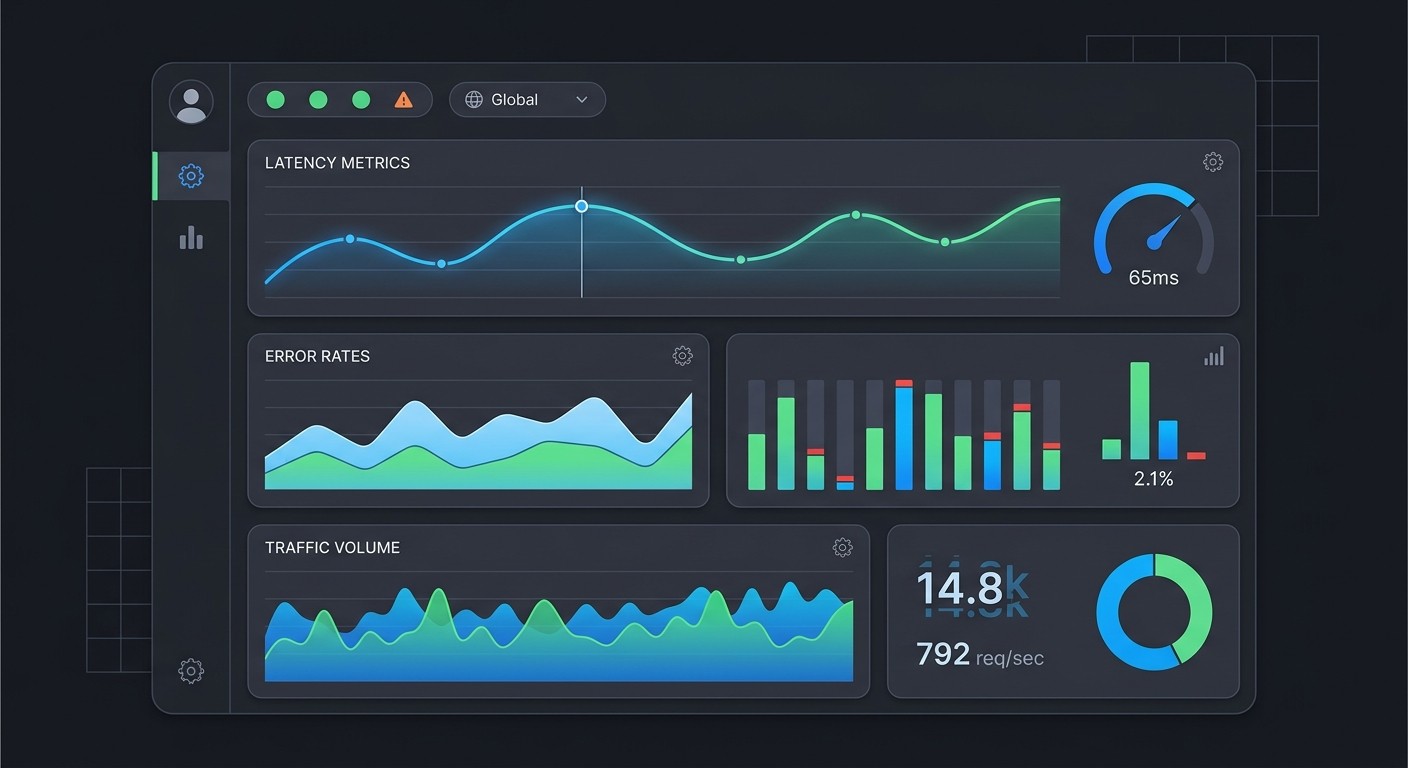
Logs — timestamped records of events (use structured JSON format for searchability)
Metrics — aggregated numbers like CPU usage, request latency, error rates
Traces — the full journey of a request through your distributed system
Google's Site Reliability Engineering handbook defines four golden signals every team should monitor: latency, traffic, errors, and saturation. If you track nothing else, track these.
The practical step most teams miss: annotate deployments on your dashboards. When an error spike appears, you should instantly see which deploy caused it.
Link your logs, metrics, and traces together so an error count leads you straight to the failing request trace and the relevant log entries. That's the difference between a 5-minute fix and a 2-hour investigation.
5. Multi-Stage Deployment Pipeline
A deployment pipeline is a series of quality gates your code must pass before reaching users. Each stage catches a different class of problem:
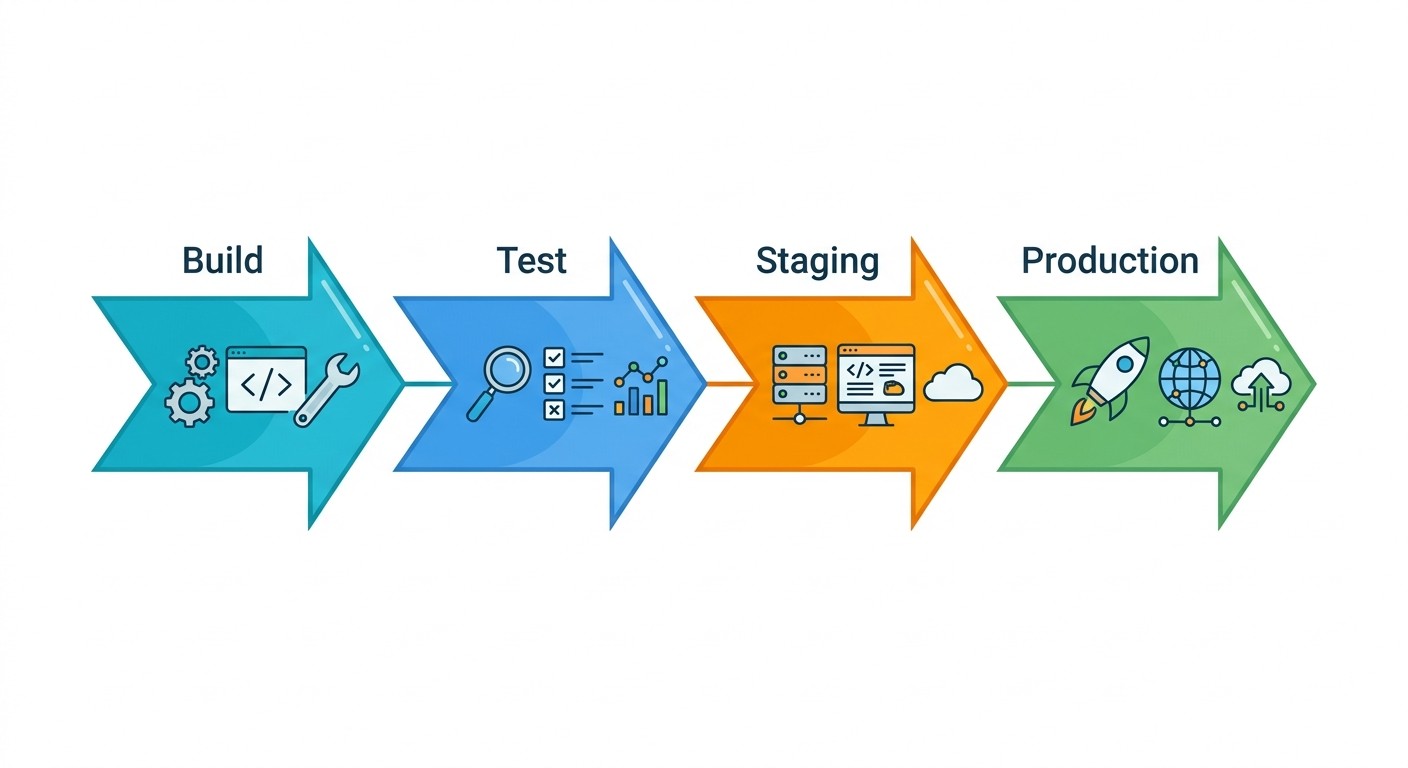
Build — compile code, create an immutable artifact
Test — run unit and integration tests against that artifact
Staging — deploy to a production-like environment for E2E validation
Production — deploy the same artifact to live users
The critical principle: build once, deploy many. The artifact from the build stage is the exact same one that goes through staging and into production. If you rebuild between stages, you can't guarantee that what you tested is what you released.
At CatDoes, this is how a two-person engineering team ships updates multiple times a week without breaking the app for thousands of users. Every change goes through the same build artifact across staging and production.
Keep staging and production environments as identical as possible. Configuration drift between them is one of the most common sources of "worked in staging, broke in prod" incidents. For a deeper look at the end-to-end process, see our guide on how to launch an app.
6. Database Migration and Schema Management
Imagine deploying new application code that expects a column called user_email, but your database still has it as email. Your app crashes instantly for every user. Database changes are the riskiest part of continuous deployment because they're hard to reverse and affect live data.
The solution: treat schema changes as versioned code. Tools like Flyway, Liquibase, and Alembic let you write migration scripts that move your database forward (or backward) in a controlled sequence. Companies like Shopify run thousands of these migrations without disrupting service.
The golden rule: backward compatibility
Always make additive changes. Add new columns instead of renaming old ones. Deploy the migration first, verify it works, then deploy the application code that depends on the new schema.
This means both the old and new application versions work simultaneously during the transition. Keep each migration small — one logical change per file — so failures are easy to diagnose.
7. Canary and Blue-Green Deployments
Both strategies reduce deployment risk, but they work differently:
Strategy | How it works | Best for |
|---|---|---|
Canary | Route 1-5% of traffic to the new version, then gradually increase | Validating performance with real traffic before full rollout |
Blue-Green | Run two identical environments; switch all traffic at once after validation | Instant rollback capability when something goes wrong |
Netflix uses canary analysis across regions to detect issues early. Amazon uses blue-green deployments for its e-commerce platform. Both approaches require automated health checks and predefined rollback triggers — set them on error rate increases, latency spikes, or conversion drops so the system recovers without human intervention.
8. Git Workflows and Version Control
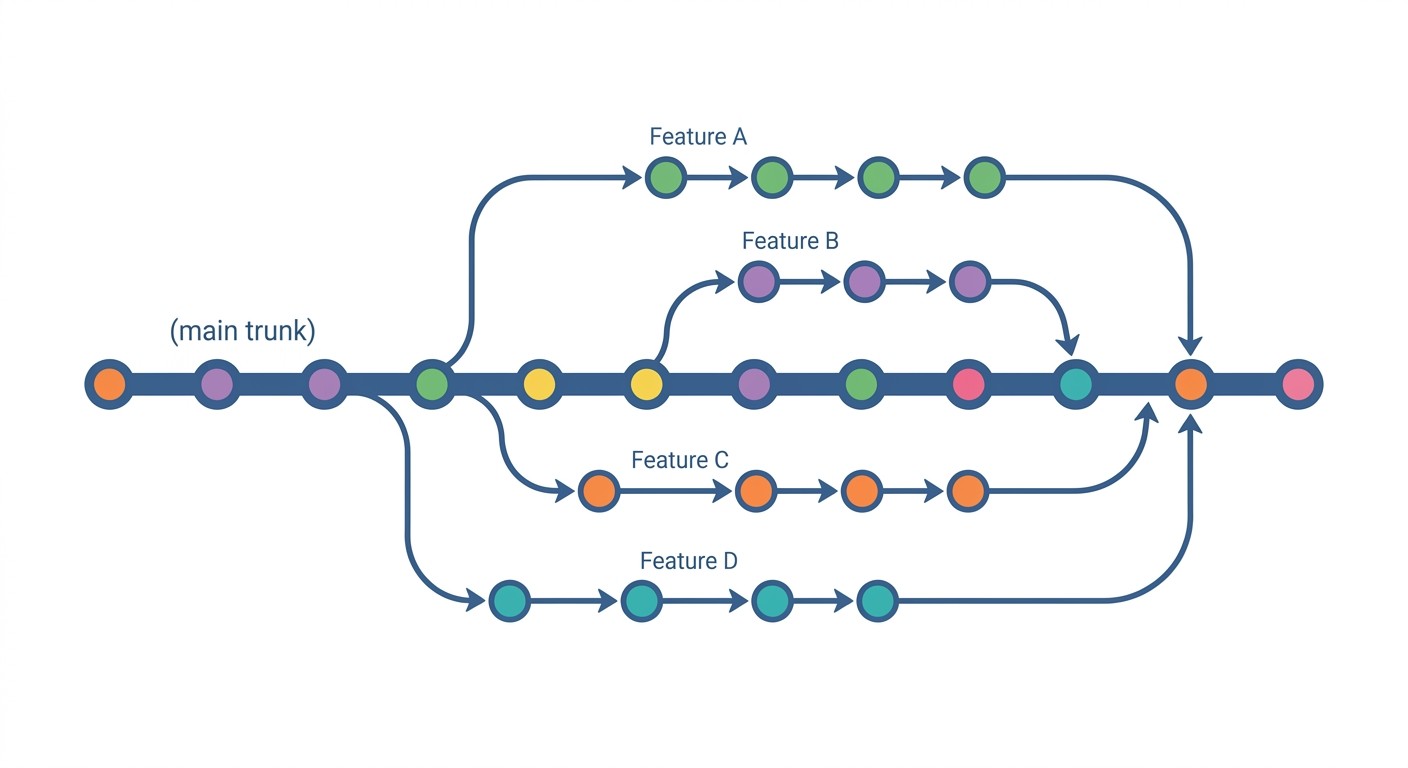
For continuous deployment, trunk-based development wins. The pattern: developers work on short-lived feature branches (1-2 days max), then merge back into the main trunk through pull requests. The trunk is always in a deployable state.
This is the opposite of long-lived feature branches that accumulate merge conflicts. Facebook, Google, and Spotify all use trunk-based development because it keeps the integration feedback loop tight. Small, frequent commits are far less risky than large batch releases.
Enforce it with automation
Set branch protection rules: require at least one approval and passing CI before merge.
Use conventional commit messages (
feat:,fix:,chore:) to automate changelogs and semantic versioning.Block merges automatically when tests fail or commit messages don't follow the format.
9. Container Orchestration with Kubernetes
When your application runs in containers, you need something to manage scaling, restarts, and networking across dozens or hundreds of instances. That's what Kubernetes does. This overview explains the core concepts:
Three capabilities matter most: declarative configuration (define desired state in YAML, Kubernetes maintains it), self-healing (failed containers restart automatically on healthy nodes), and service discovery (stable DNS names and automatic load balancing).
Spotify migrated its entire backend to Kubernetes to improve deployment speed. Pinterest did the same for resource efficiency. Both moves reflect a broader push toward modern cloud infrastructure that gives teams more deployment flexibility.
For your pipeline, adopt GitOps: store Kubernetes manifests in Git and use Argo CD or Flux to sync cluster state automatically. Set CPU and memory limits on every container, and isolate workloads with namespaces.
10. Incident Management and Post-Deployment Validation
Google's SRE team popularized a mindset shift: treat operations as a software problem. That means automating the response to failure, not just the deployment of code.
After every deployment, run smoke tests — a small critical set that verifies core functionality works. Monitor error rates, latency, and saturation against baseline thresholds. If any metric degrades, trigger an automatic rollback to the last stable version.
When things go wrong anyway
Runbooks — document step-by-step procedures for common failures (database connection errors, API rate limit spikes, certificate expirations).
Blameless postmortems — after every incident, identify systemic causes, not individual mistakes. The goal is to fix the system, not assign blame.
Fire drills — practice incident response regularly. Run chaos engineering experiments to verify your team and tooling work under pressure.
Tools like PagerDuty automate alerting, but the culture matters more than the tooling. Teams that practice incident response recover faster when real incidents happen.
Quick Comparison
Practice | Complexity | Best For | Key Benefit |
|---|---|---|---|
Automated Testing | High | Frequent commits, microservices | Early bug detection, faster feedback |
Infrastructure as Code | Medium-High | Multi-environment provisioning | Reproducible, auditable infrastructure |
Feature Flags | Medium | Gradual rollouts, A/B testing | Decouple deploy from release |
Monitoring/Observability | High | Distributed systems | Proactive detection, fast root cause analysis |
Multi-Stage Pipeline | Medium | Regulated or high-stakes releases | Consistent process, audit trails |
Database Migrations | High | Evolving schemas, high-volume data | Safe schema evolution with rollback |
Canary/Blue-Green | Medium-High | High-traffic, critical services | Minimized blast radius |
Git Workflows | Low-Medium | All development teams | Traceability, safe collaboration |
Kubernetes | High | Containerized microservices at scale | Auto-scaling, self-healing |
Incident Management | Medium | Production-critical services | Lower MTTR, structured learning |
Frequently Asked Questions
What is the difference between continuous delivery and continuous deployment?
Continuous delivery means every code change is automatically tested and built into a release candidate, but a human decides when to push it to production. Continuous deployment removes that manual gate — every change that passes automated tests goes to production automatically. The difference is a single approval step.
How often should you deploy to production?
Elite teams deploy on demand, often multiple times per day. DORA research shows that deployment frequency is one of four key metrics that separate high-performing teams. Start with weekly deployments and increase frequency as your test coverage and monitoring improve.
Is continuous deployment suitable for small teams?
Yes — small teams often benefit the most. With fewer people, manual deployment processes become bottlenecks faster.
Start with automated testing and a basic multi-stage pipeline. You don't need Kubernetes or canary deployments on day one. Add practices incrementally as your application and team grow.
What tools do teams commonly use for continuous deployment?
Popular CI/CD platforms include GitHub Actions, GitLab CI/CD, Jenkins, and CircleCI. For infrastructure as code, Terraform leads. Feature flags are handled by LaunchDarkly or open-source alternatives like Unleash.
Kubernetes dominates container orchestration. Most teams combine 3-4 tools from this ecosystem.
What is the difference between continuous integration and continuous deployment?
Continuous integration (CI) means merging code changes into a shared repository frequently, with each merge triggering automated builds and tests. Continuous deployment (CD) goes further and automatically releases every change that passes the test suite to production. CI is a prerequisite for CD. You need reliable automated testing before you can safely automate releases.
What are the biggest risks of continuous deployment?
Deploying bugs to all users simultaneously (solved by canary deployments), breaking database compatibility (solved by backward-compatible migrations), and missing production issues (solved by observability). Each of the 10 practices in this guide specifically mitigates one of these risk categories.
Start Shipping Faster
These 10 practices turn your deployment pipeline from a source of anxiety into a competitive advantage. You don't need to adopt all of them at once. Start with automated testing and a multi-stage pipeline — those two alone will transform how confidently your team ships code.
If you're building apps and don't want to manage deployment pipelines at all, CatDoes handles CI/CD, hosting, and backend infrastructure automatically — so you can focus on your product while the platform handles the ops.
Nafis Amiri
Co-Founder of CatDoes


