Blog
Tutorials
What Is Cloud Infrastructure Explained a Simple Guide
Curious what is cloud infrastructure? This guide breaks down the core components, service models, and benefits in simple terms for business owners and startups.

Nafis Amiri
Co-Founder of CatDoes
When you hear the term "cloud infrastructure," what comes to mind? It’s the collection of hardware and software, things like servers, storage drives, and networking gear, that quietly powers what we call the cloud. It’s the massive, invisible foundation that lets you access apps and data over the internet, from anywhere in the world.
What Is Cloud Infrastructure in Simple Terms
Think of it like your city’s power grid. When you need electricity, you just plug an appliance into an outlet. You don’t build a power plant, manage fuel, or fix generators. You just pay for what you use.
In the digital world, cloud infrastructure is the exact same idea. Companies like Amazon (AWS), Google (GCP), and Microsoft (Azure) have built enormous global networks of data centers packed with physical hardware. This is the internet's power plant.
From Owning to Renting Digital Resources
Instead of buying and maintaining your own expensive servers in a closet or a private data center, you can simply "plug in" to this digital grid. Over the internet, you rent computing power, data storage, and other services on demand.
This shift from owning hardware to renting virtual resources is the heart of cloud computing. It completely changes how businesses get started and grow, eliminating the need for huge upfront investments in equipment and the endless costs of maintenance, cooling, and real estate.
The real power of cloud infrastructure is its ability to give any business the agility and scale of a massive enterprise, but with a flexible, pay-as-you-go cost. It levels the playing field, letting startups compete with giants.
Powering Modern Digital Experiences
Every time you stream a movie, use a mobile app, or open an online document, you're interacting with cloud infrastructure. It’s the invisible engine that powers our daily digital lives and lets businesses deliver services to millions of people instantly.
This foundational layer unlocks some incredible benefits:
On-Demand Access: Get the computing resources you need in minutes, not the weeks or months it takes to order and set up physical hardware.
Global Reach: Deploy your applications closer to users anywhere in the world, which cuts down on lag and improves their experience.
Flexibility and Scale: Automatically scale your resources up or down to match user traffic, so you never pay for more than you need.
Platforms like CatDoes Cloud are built on top of this powerful foundation. They handle all the complex management of the underlying infrastructure, freeing up creators and entrepreneurs to focus on building great applications without getting stuck in the technical weeds.
The Essential Building Blocks of the Cloud
To really get what cloud infrastructure is, you have to look at its core components. These are the fundamental resources that cloud providers bundle together to deliver all those on-demand digital services we use every day. Think of them as the essential ingredients in a recipe. Each one has a specific job, but together they create a powerful and flexible platform for building pretty much anything.
These building blocks aren’t just abstract tech terms. They're the digital versions of real-world hardware, working behind the scenes to power every online interaction, from sending an email to running a massive enterprise application. Let's break down the four most critical pieces that form the cloud's foundation.
Compute: The Engine of the Cloud
Compute is the raw processing power, the "brain," of the cloud. It’s the Central Processing Units (CPUs) and Random-Access Memory (RAM) that execute commands, run calculations, and process data. In simple terms, this is what actually runs your software.
Imagine a powerful engine in a car. A stronger engine means the car can perform its tasks faster and more efficiently. In the cloud, compute resources are the engines that run your app's code, power your databases, and perform all the logic that makes your software work.
When you rent a virtual machine or use a serverless function, you're essentially renting a slice of this massive computational power. Cloud providers manage enormous fleets of physical servers, letting you access precisely the amount of processing power you need, right when you need it. This stops you from overpaying for idle capacity or, even worse, running out of steam during a traffic spike.
Storage: The Digital Warehouse
Storage is where all your data lives. This includes everything from lightning-fast solid-state drives (SSDs) for active databases to slower, more affordable hard disk drives (HDDs) for long-term archives. It’s the digital equivalent of a massive, secure, and infinitely expandable warehouse.
Think of it like a self-storage facility. You can rent a small locker for a few important things or a huge unit for everything you own. Cloud storage works the same way, offering different types for different jobs:
Object Storage: Perfect for storing huge amounts of unstructured data like images, videos, and backups. It’s incredibly durable and cheap.
Block Storage: This acts like a traditional hard drive for your virtual servers, giving you the high-speed access needed for databases and demanding applications.
File Storage: A centralized file system that multiple compute instances can access at once, ideal for shared content and team projects.
Cloud storage is built for durability and accessibility. Providers often replicate your data across multiple physical locations to protect it against hardware failure or even a regional disaster.
Networking: The Superhighway Connecting Everything
Networking is the invisible fabric that ties all the other components together. It’s made up of routers, switches, and miles of cabling that direct traffic between compute and storage resources, and also connects them to users over the internet. It’s the digital superhighway system that makes sure data gets where it needs to go, quickly and securely.
Without a robust network, compute and storage would just be isolated islands, unable to talk to each other. Cloud networking handles all the complex routing, load balancing, and security rules that let applications function reliably on a global scale. It's a critical piece of the puzzle that ensures a smooth user experience. You can learn more about how these components form the foundation for modern application backends by exploring what backend-as-a-service is and how it works.
Virtualization: The Secret Sauce
Virtualization is the technology that makes the cloud possible. It’s a process that allows a single, powerful physical server to be sliced up into multiple isolated virtual machines (VMs). Each VM runs its own operating system and acts like a totally independent computer, but they all share the underlying physical hardware.
Virtualization is the key to efficiency in cloud infrastructure. It allows providers to maximize the use of their physical hardware, which translates into lower costs and greater flexibility for customers.
This is the "secret sauce" that lets cloud providers pool and allocate resources so effectively. Instead of dedicating one entire physical machine to a single customer, they can serve many customers from the same hardware. This creates huge economies of scale that make cloud computing so affordable and is the cornerstone of the on-demand, scalable services we all rely on today.
Choosing Your Service: IaaS, PaaS, and SaaS
When you dip your toes into the cloud, you'll quickly run into three acronyms: IaaS, PaaS, and SaaS. They represent the different ways you can use cloud infrastructure, each offering a different balance of control and convenience. Getting this choice right is fundamental to building your project on a solid foundation.
Let's break them down with a simple analogy everyone understands: pizza. How you get your pizza, whether making it from scratch, ordering delivery, or dining out, perfectly mirrors how these cloud services work.
IaaS: The Do-It-Yourself Approach
Infrastructure as a Service (IaaS) is like buying all the raw ingredients for your pizza at the grocery store. You get the flour, tomatoes, and cheese, but you’re responsible for everything else. You have to make the dough, prep the sauce, assemble it all, and bake it in your own oven.
In the cloud world, this means a provider gives you the raw ingredients: virtual servers (compute), storage, and networking. You get total control over these resources, which is powerful. But it also means you’re on the hook for managing the operating system, databases, and all the software your application needs to run.
This model offers maximum flexibility, making it a great fit for experienced teams that need to build highly customized systems from the ground up.
PaaS: The Best of Both Worlds
Platform as a Service (PaaS) is like ordering pizza for delivery. The restaurant handles making the dough, the sauce, and the baking. All you have to worry about is picking the toppings and enjoying it at home. No oven to preheat, no messy kitchen to clean up.
With PaaS, the provider manages the underlying infrastructure, including servers, storage, networking, and the operating system. They give you a ready-made platform where you can just deploy and run your applications. You focus on writing your code and managing your data, not on the complex backend plumbing.
PaaS strikes a perfect balance between control and convenience. It abstracts away all the low-level infrastructure work, letting developers build and launch applications way faster.
This is a massive accelerator for development, which is why it's so popular with developers and businesses focused on rapid innovation. A great example of this simplified approach is serverless computing, which you can learn more about in our guide on what is serverless architecture.
The diagram below shows the core building blocks that IaaS provides and PaaS builds upon.
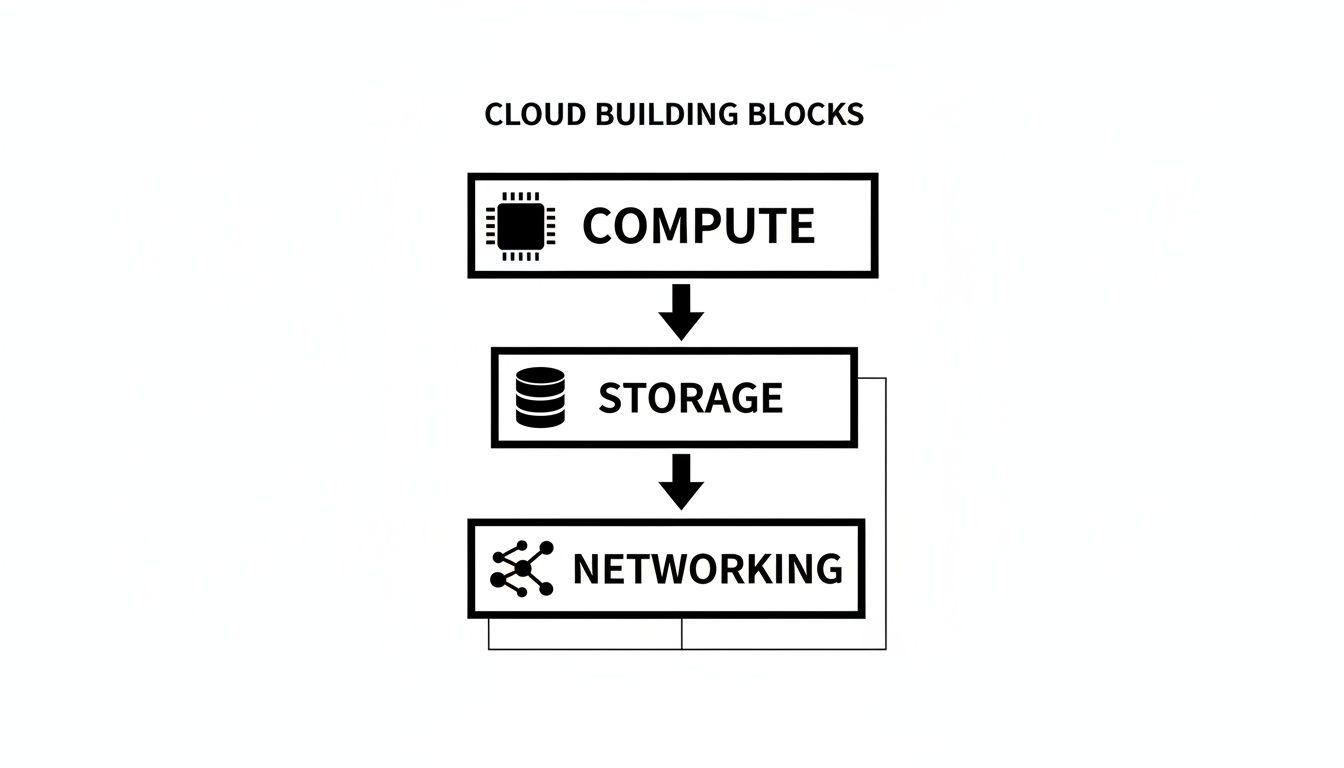
As you can see, compute, storage, and networking are the absolute essentials for any cloud service.
SaaS: Just Enjoy the Service
Software as a Service (SaaS) is the simplest model of all. It’s like going out to eat at a pizza restaurant. You just walk in, sit down, and order. The restaurant handles everything: the ingredients, the cooking, the service, and even the cleanup. You just enjoy your meal.
SaaS products are ready-to-use applications you access over the internet, usually with a subscription. Think of tools you probably use every day, like Google Workspace, Slack, or Salesforce. You don’t manage any infrastructure at all; you just use the software.
This model is all about convenience. The provider takes care of all the updates, maintenance, and infrastructure, so you don't have to. To better understand how these models differ, it's helpful to see what you manage versus what the provider manages. For a deeper look, check out this excellent guide on IaaS, PaaS, and SaaS cloud services solutions.
To make this crystal clear, here’s a simple breakdown of who manages what in each model.
A Simple Comparison of IaaS, PaaS, and SaaS
This table shows exactly where the line is drawn between your responsibilities and the provider's.
Management Responsibility | IaaS (Infrastructure as a Service) | PaaS (Platform as a Service) | SaaS (Software as a Service) |
|---|---|---|---|
Applications & Data | You Manage | You Manage | Provider Manages |
Runtime & Middleware | You Manage | Provider Manages | Provider Manages |
Operating System | You Manage | Provider Manages | Provider Manages |
Servers & Storage | Provider Manages | Provider Manages | Provider Manages |
Networking | Provider Manages | Provider Manages | Provider Manages |
As you can see, the further you move from IaaS to SaaS, the less you have to manage yourself, freeing you up to focus on what matters most for your business.
Platforms like CatDoes Cloud offer a unique approach, giving you a PaaS-like environment with the simplicity of a SaaS product. You get the power to build and deploy custom applications without ever touching a server, giving you the best of both worlds.
Where Your Cloud Can Live: Deployment Models
Just as there are different kinds of housing, there are different ways to set up your cloud infrastructure. The choice you make boils down to your specific needs for security, cost, control, and how much you expect to grow. This decision dictates where your apps and data physically live and who’s on the hook for managing it all.
Think of it like deciding where to live. You could rent an apartment, buy a house, or even do a bit of both. Each option comes with its own set of trade-offs that fit different lifestyles and budgets. Let's walk through the four main models using that simple idea.
Public Cloud: The Apartment Complex
The Public Cloud is the most common setup, and it’s a lot like living in a big apartment building. A third-party provider, think Amazon Web Services (AWS), Google Cloud, or Microsoft Azure, owns and operates all the hardware. They’re the landlord, taking care of the building, security, and all the maintenance.
You and many other "tenants" share the same building, but you each have your own secure apartment. This shared model makes it incredibly cost-effective because you only pay for your own unit (the resources you actually use). It also offers massive scalability; if you need more space, you can just upgrade to a bigger apartment in minutes. This pay-as-you-go approach is perfect for startups and SMBs looking to avoid huge upfront hardware costs and grow quickly.
Private Cloud: Your Own Private House
A Private Cloud is the digital version of owning your own house. The infrastructure is dedicated exclusively to one organization. You get total control over the property, from the security system right down to the interior design. This gives you the highest possible level of privacy and security.
This model is a great fit for organizations with strict regulatory or data sovereignty requirements, like those in finance or healthcare. But just like owning a house, it comes with higher costs and more responsibility. You’re in charge of buying, managing, and maintaining everything, which requires a serious capital investment and a skilled IT team. For anyone interested in this level of control, exploring something like a self-hosted Supabase alternative can offer a glimpse into what managing your own backend really involves.
The key trade-off between public and private clouds is convenience versus control. Public clouds offer speed and low initial costs, while private clouds provide maximum security and customization at a higher price.
Hybrid Cloud: The Best of Both Worlds
A Hybrid Cloud mixes a private cloud with one or more public cloud services. This is like owning a house but renting a storage unit for stuff you don’t need to access every day. You keep your most sensitive data and critical apps in your private, secure "house" while using the public cloud's "storage unit" for less sensitive work, development environments, or to handle unexpected spikes in traffic.
This setup offers incredible flexibility, letting businesses get the security of a private cloud with the cost-efficiency and scale of a public one. A 2025 report found that 89% of enterprises now run on a hybrid cloud strategy, which tells you just how popular it's become.
Multi-Cloud: Diversifying Your Providers
Finally, Multi-Cloud is a strategy where a business uses services from more than one public cloud provider. Think of it like using different utility companies for your home. You might get your electricity from one provider because they have the best rates, and your internet from another because they offer the fastest service in your area.
In the tech world, a business might use AWS for its data analytics and Google Cloud for its machine learning tools to get the best-in-class service for each specific job. This strategy helps avoid getting locked into one vendor and lets companies optimize for performance and cost across different providers.
Real Business Benefits of Cloud Infrastructure
Knowing the technical bits and pieces of cloud infrastructure is one thing, but the real question every business owner asks is simple: "Why should I care?" The answer isn't just about technology; it’s about real, tangible advantages that give modern businesses a serious competitive edge. These benefits aren't just for huge corporations anymore. They’re powerful tools for startups and small businesses looking to punch above their weight.
Moving to the cloud fundamentally rewrites your financial playbook for the better. It completely erases the need for massive, upfront capital spending on physical servers, storage hardware, and networking gear.
Superior Cost Efficiency
Instead of sinking cash into expensive equipment that might just sit there collecting dust, you switch to a pay-as-you-go model. It works just like your electricity bill: you only pay for the exact resources you use, when you use them. This instantly frees up critical cash flow, letting you pour money into what really matters, such as growing your business, marketing your product, or hiring great people, instead of tying it up in hardware that loses value every day.
This financial agility is a lifeline for startups and SMBs, where every dollar is precious. You can launch a new product or test a new market with almost no initial investment, all without risking a huge chunk of capital on infrastructure you might not even need.
Unmatched Scalability and Elasticity
One of the most powerful things cloud infrastructure offers is its mind-blowing scalability. Picture this: your app gets a surprise feature in a major publication, and your traffic suddenly explodes by 1,000%. With old-school, on-premise hardware, your servers would almost certainly melt down, leading to angry users and a massive missed opportunity.
In the cloud, you can automatically ramp up your resources to handle that spike in a matter of minutes. And just as important, you can scale right back down once the rush is over. This dynamic ability to grow or shrink on demand is called elasticity.
Cloud elasticity means you always have the perfect amount of power for the job. You stop overpaying for peak capacity you rarely use, while making sure your service stays fast and reliable even during those unexpected moments of wild success.
This is a must-have for any business with fluctuating demand, like an e-commerce store during the holidays or a streaming service during a big live event.
Enhanced Security and Reliability
The big cloud providers, think Amazon Web Services, Google Cloud, and Microsoft Azure, invest billions of dollars a year in security. They employ armies of the world’s best experts to defend their infrastructure, achieving a level of security that most individual companies could never dream of matching on their own.
They handle the heavy lifting:
Physical Security: Locking down data centers with things like biometric scanners and 24/7 surveillance.
Network Security: Fending off large-scale attacks like Distributed Denial of Service (DDoS) that could knock you offline.
Global Redundancy: Copying your data across different geographic locations so that if one data center has a problem, your service stays online without a hiccup.
This incredibly robust foundation delivers exceptional reliability and uptime, giving you peace of mind and building trust with your customers. The proof is in the numbers. The global cloud computing market is growing so fast it’s set to blow past $1 trillion in early 2026. This boom, with infrastructure spending alone projected to hit $106.9 billion in Q3 2025, shows that the cloud isn't a trend. It's the standard for how modern businesses operate. You can find more data on the acceleration of cloud adoption on softjourn.com.
By using their shared responsibility model, you get to focus on securing your own application and data, knowing that the bedrock it's built on is in the best hands possible.
How CatDoes Cloud Simplifies Everything
Knowing what cloud infrastructure is and actually managing it are two completely different things. For most creators and entrepreneurs, the idea of configuring servers, setting up databases, and securing networks is a huge roadblock. It’s the kind of technical bog that slows down real innovation. This is exactly why abstraction and automation have become so important, and it’s the core idea behind modern software platforms.
CatDoes Cloud is designed to act as your expert DevOps team, completely removing these technical hurdles. Instead of wrestling with complicated setups, you just describe what your application needs in plain English. Our AI agents take it from there, automatically setting up and managing all the backend services you need.
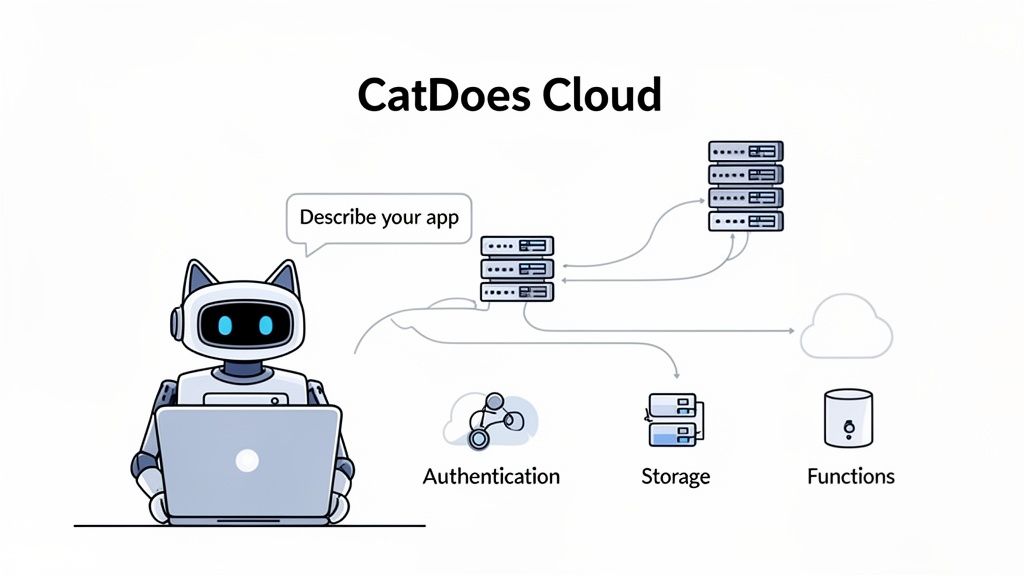
This approach radically simplifies the entire development process. What used to take months of specialized work can now be done in days, sometimes even hours.
From Manual Complexity to AI-Driven Simplicity
Traditionally, launching an app required a deep understanding of cloud infrastructure and a long, painful checklist of technical tasks. You had to manually piece everything together. To see how much platforms have changed this, it's helpful to understand the principles of automated infrastructure management.
CatDoes automates that entire workflow. Imagine you need to add user sign-ups to your app. The old way involved manually configuring an authentication service, setting up a user database, and writing code to connect them. With CatDoes, you simply tell our AI what you need. It handles everything, giving you a secure and scalable solution instantly.
This applies to all the critical backend pieces you'd otherwise have to build yourself:
User Authentication: Securely manage sign-ups, logins, and user profiles without writing a single line of backend code.
File Storage: Easily handle image uploads, documents, and other user-generated content with a fully managed storage solution.
Serverless Functions: Run custom backend logic, like sending a welcome email when a new user signs up, all without ever thinking about a server.
The New Standard for Building Applications
This level of automation makes CatDoes a true end-to-end platform for bringing ideas to life. The cloud has created a mature ecosystem where users expect fast, reliable digital experiences from day one. Today, with over 94% of businesses using cloud services and around 60% of all corporate data stored there, the foundation is set. The cloud infrastructure services market is even projected to grow by $141.7 billion between 2026 and 2030, which shows our reliance on it is only getting stronger.
CatDoes Cloud leverages this powerful, global infrastructure but adds a crucial layer of AI-driven simplicity. We make the benefits of the cloud accessible to everyone, not just those with deep technical expertise.
By getting rid of the friction of backend setup, we empower creators and entrepreneurs to focus entirely on building a great user experience. You can finally stop worrying about the "how" and concentrate on the "what," bringing your vision to market faster than ever before.
Common Questions About Cloud Infrastructure
Even with the big picture in place, a few practical questions always pop up, especially for founders and business owners dipping their toes into the cloud for the first time. Getting these cleared up can make the path forward feel a lot less intimidating.
Let's tackle some of the most common "what-ifs" and "how-tos" that come up when people think about moving to the cloud.
What Is the Main Difference Between Cloud and On-Premise Infrastructure?
The biggest difference comes down to ownership and location.
With on-premise infrastructure, you own everything. You buy the physical servers, you find a place to store them (often a dedicated, air-conditioned room), and you pay a team to maintain them. It's a huge upfront investment in hardware and people.
Cloud infrastructure flips that model entirely. You're essentially renting computing power, storage, and networking from a massive provider like AWS or Google Cloud over the internet. Your cost shifts from a massive capital expense to a predictable monthly operating expense. The real game-changer, though, is that you can scale up or down in minutes without ever touching a piece of hardware.
Is Cloud Infrastructure Secure for My Business?
Yes, it's incredibly secure. In fact, it's almost certainly more secure than what most businesses could build on their own. Major cloud providers pour billions of dollars a year into security, employing teams of experts to protect their data centers and networks from threats.
But here’s the key thing to understand: security in the cloud is a shared responsibility.
The Provider's Role: They secure the cloud itself, including the physical buildings, the servers, and the core network. Think of them as providing a military-grade, reinforced concrete bunker.
Your Role: You are responsible for securing what you put inside the cloud. This means managing who has access, configuring your applications correctly, and protecting your data.
Security is a partnership. The cloud provider gives you a secure foundation, but you still need to build your house with locks on the doors. Using a platform like CatDoes Cloud helps by handling many of these security configurations for you automatically, reducing the risk of common mistakes.
How Can I Start Using the Cloud Without Technical Skills?
For a non-technical founder, the most direct route is to use a platform that abstracts away all the complexity. This is precisely why we built CatDoes.
Instead of spending months learning how to configure servers, set up databases, or manage network rules, you can use a simple, intuitive interface.
With our platform, you describe what you want your application to do in plain English. Our AI agents then automatically build, configure, and manage all the necessary cloud infrastructure for you on CatDoes Cloud. You get all the power and scalability of the cloud without the brutal learning curve, letting you launch your ideas fast.
Ready to build your app without getting lost in the technical details? With CatDoes, you can turn your ideas into a production-ready application using simple, natural language. Let our AI agents handle the complex backend setup so you can focus on creating an amazing product. Start building for free today at https://catdoes.com.
Nafis Amiri
Co-Founder of CatDoes