Blog
Insights
Build Once Deploy Everywhere With Cross Platform Mobile Apps
Discover how cross platform mobile apps reduce costs and speed up development. This guide covers top frameworks and proven strategies for your next project.

Nafis Amiri
Co-Founder of CatDoes

Imagine you need two different keys to unlock your house and your car. Now imagine having a single master key that works for both. That’s the simple idea behind cross-platform mobile apps. It’s a way to build one app that runs smoothly on both iPhones and Android devices.
Instead of building two separate apps from the ground up, you write the code once. This single, adaptable codebase lets you reach a massive audience much faster and with a fraction of the budget.
Why Is Everyone Talking About Cross-Platform?
Not long ago, if you wanted your app on both the App Store and Google Play, you had no choice but to build it twice. That meant hiring two different teams, managing two separate projects, and doubling your maintenance work. It was slow, expensive, and forced businesses to pick a side, instantly cutting their potential customer base in half.
Cross-platform development completely flips that script. By writing code once and deploying it everywhere, it solves an old, expensive problem. It’s no longer a niche workaround but a smart, strategic move for any business that wants to be efficient and reach as many people as possible.
The Business Case for a Single Codebase
The momentum behind this approach comes down to one thing: powerful efficiency. Whether you're a startup on a shoestring budget or a big company looking to move faster, developing a single app streamlines everything from the first line of code to future updates.
This translates directly into some serious business advantages:
Launch in Record Time: Writing one codebase instead of two slashes your development timeline. You can get your product into users' hands and start collecting feedback in a fraction of the time.
Slash Your Development Costs: One team and one codebase costs a whole lot less than running two parallel projects. That’s money you can put back into marketing, new features, or growing your business.
A Consistent Brand Experience: With a shared codebase, your app looks, feels, and works the same everywhere. This consistency builds a stronger brand and creates a more trustworthy experience for your users.
The real value is simple: you build a more cohesive product with less headache. Instead of worrying about differences between the iOS and Android versions, your team can focus on creating one great experience that just works for everyone.
This isn't just a trend; it's a direct response to how the world works now. As of December 2025, there are around 6.92 billion smartphone users out there, a massive audience waiting for your app. At the same time, the cost to build a complex native app from scratch has climbed past $171,450, according to industry reports.
For modern businesses, cross-platform isn't a compromise. It's a strategic necessity for staying competitive in a packed digital world.
Choosing Your Path: Native Vs. Cross-Platform Apps
Deciding between native and cross-platform development is a critical fork in the road for any app project. This choice isn't about which is definitively "better," but which approach is the right fit for your specific goals, budget, and timeline. Each path offers a unique set of advantages designed for different kinds of applications.
Imagine building a high-performance race car. You’d engineer every single component specifically for that vehicle to squeeze out maximum speed and responsiveness. That’s native development. It’s the undisputed champion for demanding applications like intensive 3D games, augmented reality experiences, or fintech platforms that need deep hardware integration and uncompromising security.
Now, think of a versatile multi-tool. It's designed for efficiency and adaptability, capable of handling a wide range of common tasks with a single, convenient instrument. This is the essence of cross-platform mobile apps. It's the ideal solution for content-driven applications, e-commerce stores, and internal business tools where reaching a broad audience quickly is the top priority.
When Native Development Is The Best Choice
Going native means building separate, dedicated apps for iOS (using Swift or Objective-C) and Android (using Kotlin or Java). While this definitely requires more resources, it pays off with unparalleled performance and immediate access to the latest device features.
Choose native development when:
Peak Performance is Non-Negotiable: If your app involves complex animations, heavy computations, or real-time data processing, native code offers the fastest and most responsive experience.
Deep Hardware Integration is Required: Apps that need direct control over the device’s camera, GPS, accelerometer, or other sensors benefit from the direct access native development provides.
You Need the Latest OS Features Immediately: When Apple or Google releases a new feature, native apps can use it right away. Cross-platform frameworks often have a delay before they can support these new capabilities.
When Cross-Platform Development Shines
Cross-platform development prioritizes efficiency, using a single codebase to build an app that runs on both iOS and Android. This approach dramatically speeds up development and slashes costs, making it a powerful choice for many businesses.
This path is your best bet when:
Speed to Market is Your Priority: For startups and businesses launching a minimum viable product (MVP), getting the app into users' hands quickly is vital for gathering feedback.
Your Budget is Limited: Building one app instead of two significantly cuts down on development and maintenance costs, making it a more accessible option for small and medium-sized businesses.
Brand Consistency is Key: A single codebase ensures your app delivers a uniform look, feel, and user experience across all devices, strengthening your brand identity.
The visual below helps illustrate the streamlined journey of bringing an app idea to life using a cross-platform approach.
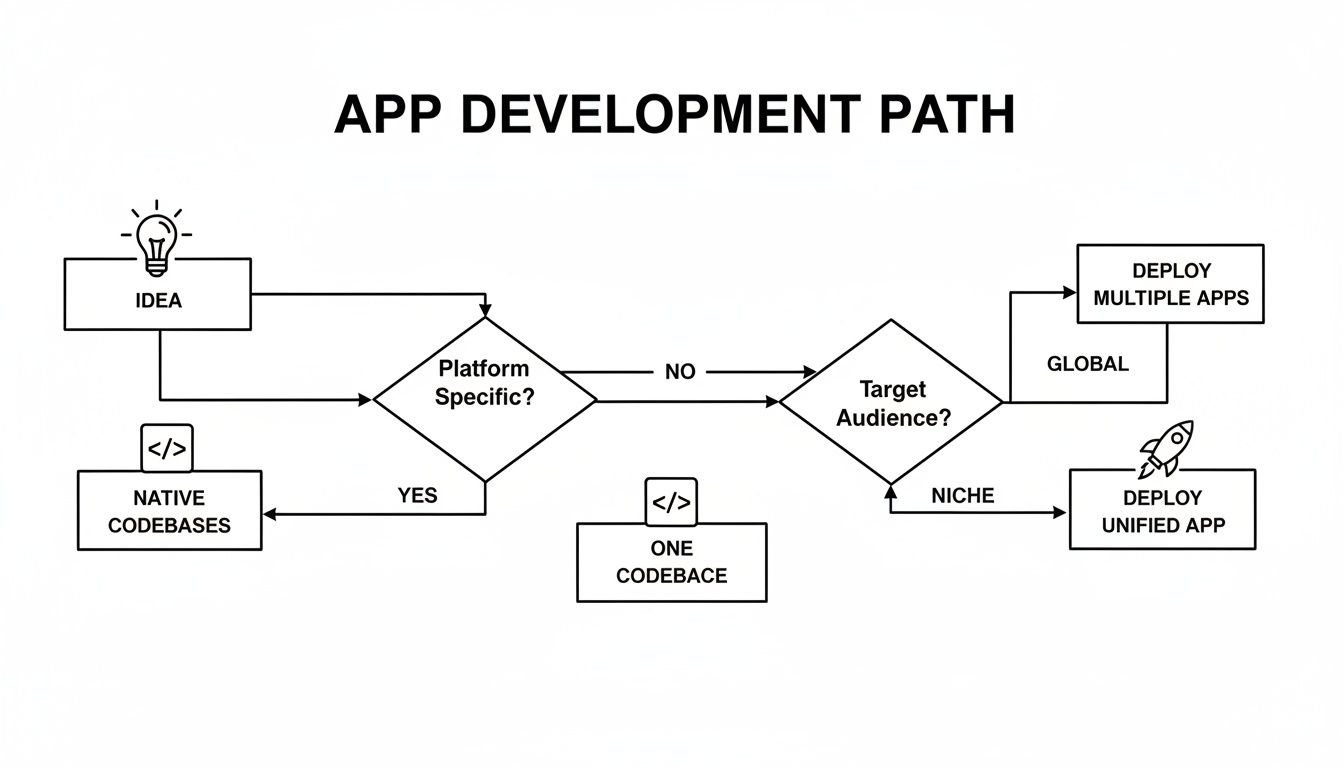
This decision tree shows how an initial idea flows into a single codebase, which then deploys to multiple platforms, simplifying the entire development lifecycle.
To make the decision clearer, here’s a straightforward breakdown of the trade-offs involved.
Native vs. Cross-Platform Decision Matrix
This table lays out the key differences to help you align your project's needs with the right development strategy.
Factor | Native App Development | Cross-Platform App Development |
|---|---|---|
Performance | Highest possible; direct access to hardware. | Very good, but a slight overhead can exist. |
User Experience (UX) | Best-in-class; follows platform-specific design conventions perfectly. | Consistent across platforms; may not feel 100% native. |
Development Cost | High; requires separate teams/skillsets for iOS and Android. | Lower; one codebase and often one development team. |
Time to Market | Slower; two separate apps must be built and maintained. | Faster; "write once, deploy everywhere" model speeds up launch. |
Code Maintenance | More complex; bug fixes and updates must be done for each platform. | Simpler; changes to the single codebase apply to both apps. |
Access to Device Features | Immediate and full access to the latest OS and hardware features. | Good, but there can be a lag for the newest features to be supported. |
Ultimately, the best choice depends entirely on your priorities. If you're building the next big social media app where a flawless, snappy UI is everything, native is probably the way to go. But if you're a startup needing to validate an idea with a functional MVP on both app stores fast, cross-platform is a lifesaver.
Choosing the right path means aligning your development strategy with your business objectives. It's about understanding that the raw power of native and the broad efficiency of cross-platform are both valid tools for different jobs.
Market data from December 2025 reflects this balanced reality. Cross-platform development now powers approximately 42% of apps globally, a figure driven by its incredible efficiency. At the same time, native development holds its ground for about two-thirds of the market, especially for high-stakes apps where speed is everything. User expectations also play a role; business users might forgive minor performance lags for faster access to tools, but consumer-facing apps need to be flawless. You can read the full research about these application development trends to see what works for you.
A Practical Guide to the Top Cross-Platform Frameworks
Alright, let's move past the theory and get our hands dirty with the tools that actually make cross-platform mobile apps work. These frameworks are the powerhouses that let a single stream of code create experiences for both iOS and Android. Picking the right one really comes down to understanding their different philosophies.
Each framework attacks the same challenge from a unique angle. Some are built to feel familiar to web developers, while others throw out the old playbook to chase peak performance and pixel-perfect design. Let's break down the big players.
React Native: The JavaScript Bridge to Native
Meta's React Native is wildly popular for one huge reason: it lets web developers build mobile apps with the JavaScript and React skills they already have. For teams fluent in web tech, this just demolishes the barrier to entry.
Here’s the clever part. Instead of just showing a web page in a box, React Native uses a "bridge" to talk to the phone's real, native UI components. That means a <Button> in your code becomes a genuine iOS or Android button. The result? An app that looks and feels right at home on the device.
This approach makes React Native a fantastic pick for:
Teams with deep JavaScript expertise: You can start building on day one without learning a whole new language.
Apps sharing code with a website: A ton of the business logic from a React web app can often be dropped right into a React Native mobile app.
Projects where speed and community matter: The ecosystem is massive. If you hit a wall, chances are someone has already built a library or written a guide to solve your exact problem.
Big names like Instagram, Skype, and Walmart have all used React Native, proving it can absolutely handle massive, high-traffic applications.
Flutter: Creating Beautiful UIs from a Single Codebase
Flutter is Google's take on cross-platform development, and it’s a complete departure from the norm. Instead of bridging to native components, Flutter brings its own. It uses a high-performance graphics engine called Skia to literally paint every pixel on the screen.
This gives developers total control over the UI, opening the door for stunning, highly-branded, and fluidly animated designs that look exactly the same on every single phone. Flutter uses a language called Dart, which is fine-tuned for building user interfaces and compiles directly to fast, native machine code.
Flutter's philosophy is all about giving you a high-performance canvas to build anything you can dream up, free from the constraints of standard iOS and Android UI kits.
This makes Flutter a perfect match for:
Brand-centric apps: When a unique, consistent visual identity is non-negotiable.
Apps with complex animations: The entire architecture is built for smooth, 60fps animations.
Projects where one developer needs to own both platforms with as few platform-specific headaches as possible.
The BMW app, eBay Motors, and The New York Times have all leveraged Flutter to create incredibly slick and responsive user experiences.
Xamarin: The Enterprise Choice for .NET Developers
Xamarin, which has evolved into Microsoft's .NET MAUI, is the undisputed champion for businesses already running on the Microsoft stack. It empowers developers to build mobile apps using C# and the powerful .NET framework.
Much like React Native, Xamarin gives you full access to native APIs and UI toolkits, so your app feels completely native. Its real superpower, though, is its tight integration with Visual Studio and the vast .NET library. For companies with existing C# developers and backend systems, it’s a no-brainer.
You should seriously consider Xamarin when:
Your development team already lives and breathes C# and .NET.
You need to share a lot of code between your mobile app and a Windows desktop application.
You need the backing of enterprise-grade tooling and official support from Microsoft.
Heavy-hitters like The World Bank and Fox Sports have trusted Xamarin for their mobile apps. Deciding between these options is a big deal, and for a deeper look, check out our guide to cross-platform mobile development tools to find what works for you.
Of course, these frameworks aren't the only game in town. It's also worth looking at the no-code space, where platforms offer a different set of trade-offs around speed and customization. For context, you can see how they operate in this Appy Pie Review. In the end, the best tool is always the one that fits your team's skills, your project's goals, and your vision for the future.
How To Choose The Right Development Framework
Picking the right development framework is one of the most critical calls you’ll make when building cross platform mobile apps. This one decision ripples through everything, including your app's performance, how fast you can build it, and how much it’ll cost. It’s not about finding the one "best" framework, but about finding the one that fits your specific project like a glove.
Think of it like choosing the right tool for a job. You wouldn't use a sledgehammer to hang a picture frame, and you wouldn't use a tiny screwdriver to break up concrete. Each framework is a specialized tool, and the right one will make your journey to a successful launch smooth and direct.
Analyze Your Performance Needs
First things first: what does your app actually do? How fast does it need to feel? The performance an app needs can vary wildly. An app for reading the news has a completely different set of demands than a fast-paced mobile game.
For High-Demand Apps: If your app relies on silky-smooth animations, complex graphics, or real-time data processing, performance is non-negotiable. You need that native-like speed, and frameworks like Flutter are built from the ground up to deliver it.
For Content-Driven Apps: For things like e-commerce stores, social media feeds, or internal business tools, the user experience is more about snappy content loading and easy navigation than raw power. Most modern cross-platform frameworks handle these scenarios beautifully.
A tiny bit of performance overhead might go unnoticed in a simple app, but it can become a deal-breaking bottleneck in a more demanding one. So, an honest look at your performance needs is the only place to start.
Evaluate Your Team's Existing Skills
The most amazing framework on the planet is useless if your team doesn't know how to wield it. Playing to your team's strengths is a massive accelerator. If your developers are already fluent in JavaScript and React, making them switch to Dart for Flutter introduces a learning curve that will slow you down.
The path of least resistance is often the smartest one. Choosing a framework that aligns with your team's current expertise means you can start building immediately, reducing ramp-up time and development costs.
For example, a team of experienced C# developers in a Microsoft-heavy environment will feel right at home with .NET MAUI (the successor to Xamarin). On the flip side, a startup with a strong web development background will probably get their product to market fastest with React Native.
Consider Development Speed And Community Support
Time-to-market is everything, especially if you're a startup trying to get a minimum viable product (MVP) out the door. While cross-platform development is inherently faster, your framework choice can speed things up even more. A framework with a huge library of ready-made components and a large, active community can save you hundreds of hours.
When you hit a wall, and you will, a vibrant community means you're just a quick search away from a solution, a tutorial, or an open-source package that solves your exact problem. For a head-to-head comparison of the two biggest ecosystems, check out our deep dive into Flutter vs React Native in 2025. This will give you a good feel for the community strengths of each.
Finally, think about how easily you can plug in other services. Your app will almost certainly need to connect to outside APIs for payments, analytics, or push notifications. Make sure the framework you pick has well-supported plugins and clear documentation for the services you know you'll need. A framework that makes these integrations simple will make the whole development ride a lot smoother.
A Step-By-Step Blueprint For Building Your App
Turning a great idea into an app that people actually use can feel like a huge mountain to climb. But it's not. The whole process becomes much clearer, and a lot less intimidating, when you break it down into a series of manageable stages. This is the exact roadmap we follow to take a concept from a sketch on a napkin to launch day.
It all starts by getting incredibly specific about what your app will do. A clear strategy from day one is your best defense against scope creep, ensuring every feature you build serves a real purpose for your users.
Stage 1: Define Your Strategy And Features
Before a single line of code gets written, you have to nail down your vision. This is the foundation of everything, where you answer the critical "what" and "why" behind your app. A solid strategy keeps your development focused and tied directly to your business goals.
Start by clearly defining the core problem your app solves. From there, make a ruthless, prioritized list of features for your Minimum Viable Product (MVP). An MVP isn’t a stripped-down, buggy app; it’s the simplest version that delivers real value to your first users and lets you gather feedback to guide what you build next.
A couple of tools make this stage way easier:
Miro or FigJam: These digital whiteboards are perfect for messy brainstorming sessions, mapping out user flows, and seeing how all the features connect.
Jira or Trello: Get your feature list into one of these tools from the very beginning. It lets you create a backlog, prioritize what's most important, and track your progress.
Stage 2: Create Intuitive UX And UI Designs
Once you know what you're building, it's time to figure out how people will use it. This stage breaks down into two key parts: User Experience (UX), which is all about the logical flow and making the app easy to use, and User Interface (UI), which covers the visuals like the colors, fonts, and overall brand identity.
The goal is simple: create an interface that feels natural and looks sharp on any device. We always start with low-fidelity wireframes to map out screen layouts and navigation paths. Once that skeleton feels right, we move to high-fidelity mockups that bring the app’s personality to life.
Your design is the first thing a user will judge. A clean, intuitive design isn’t a luxury; it’s what decides whether someone sticks around or deletes your app in the first 10 seconds.
Stage 3: Develop And Build The Core Application
This is where the magic happens as designs and strategies finally become a real, working product. Your development team will choose the best cross-platform framework for the job, set up the coding environment, and start building the app one feature at a time. This iterative approach is crucial because it allows for constant feedback and course correction along the way.
This phase involves building out the front end (everything the user sees and interacts with) and plugging it into the back end (the servers, databases, and APIs that power it all). Using a single codebase for both iOS and Android massively speeds up this process, delivering consistent functionality much faster.
The demand for these frameworks is exploding. The global market is projected to hit US$124.5 billion in 2025 and is on track to reach US$369.2 billion by 2032, all thanks to the non-stop growth of smartphone users. You can dig into more details about the cross-platform framework market growth.
Stage 4: Test Rigorously Across Devices
With the core features in place, it’s time to try and break things. Rigorous testing is the only way to guarantee a high-quality, bug-free experience for your users. This isn't just about finding crashes; it's about making sure the app performs flawlessly in the real world.
A solid testing plan should cover all the bases:
Functional Testing: Does every button, form, and feature do what it's supposed to do?
Performance Testing: How fast is it? Is it responsive? Does it drain the battery? We check this on a range of different phones.
Usability Testing: We get real people to use the app and tell us where they get stuck or confused.
Compatibility Testing: We ensure the app looks and works great across different screen sizes, OS versions, and hardware.
Stage 5: Deploy And Maintain Your App
The final step is getting your app out into the world. This means prepping it for submission to the Apple App Store and Google Play Store, which involves creating store listings, screenshots, and compelling marketing copy.
But launching the app isn't the finish line. It's the start of a continuous cycle: monitor performance, listen to user feedback, and push out regular updates. Having a streamlined deployment process is essential for getting improvements out the door quickly. Adopting continuous deployment best practices helps you fix bugs and roll out new features fast, keeping your users happy and your app ahead of the competition.
Got Questions? We've Got Answers
Stepping into the world of cross platform mobile apps is exciting, but it's totally normal for a few questions to pop up. It’s a powerful way to build, but it comes with its own quirks and considerations. Here are some of the most common questions we hear, with direct, real-world answers to help you see things clearly.
Can Cross Platform Apps Really Match Native Performance?
This is the big one, and the answer has changed a lot over the last few years. Not long ago, native apps had a clear speed advantage. Today? Modern frameworks like Flutter and React Native have almost completely closed that gap.
For the vast majority of apps out there, think e-commerce stores, social media platforms, or internal business tools, your users will never be able to tell the difference. A well-built cross-platform app feels just as snappy and responsive as its native counterpart.
You only start to see a meaningful performance difference in extreme cases, like high-fidelity 3D games or apps doing heavy, real-time data processing. For almost every other business case, the performance is more than enough, and the massive savings in time and money are a trade-off that makes perfect sense.
Which Is The Best Cross Platform Framework To Start With?
There’s no magic bullet here. The "best" framework is the one that fits your team's skills and your project's goals. Think of it like picking a vehicle for a road trip; the right choice depends on the terrain you're covering and, most importantly, who's behind the wheel.
Here’s a simple way to break it down:
If your team knows JavaScript: React Native is a no-brainer. It plugs right into the massive JavaScript ecosystem, letting web developers jump into mobile development without a huge learning curve. We go deeper on that stack in our guide to mobile development with React.
If a custom, beautiful UI is your top priority: Flutter is your best bet. Its rendering engine gives you incredible control to create expressive, highly animated interfaces that look identical on every device.
If you're deep in the Microsoft world: Xamarin (now .NET MAUI) is the obvious choice. It integrates perfectly for companies built on C# and .NET, letting you use the talent you already have.
Start by looking at your team's expertise. When you match the framework's strengths to your app's main goals, you set yourself up for a smoother, more successful build every time.
How Is Maintaining a Cross-Platform App Different?
This is where cross-platform development really shines. Instead of juggling two separate codebases for iOS and Android, you have just one. This makes everything, including fixing bugs, updating features, and rolling out changes, dramatically simpler.
Think about it: you're managing one team, not coordinating two. This cuts down on complexity, reduces the chance of errors, and saves a ton on long-term operational costs. When Apple or Google drops a major OS update, you typically only have to update your app once to stay compatible, not run two separate, expensive projects. It’s a huge win for efficiency.
Are There Any Hidden Costs I Should Know About?
While it’s almost always more cost-effective, there are a couple of potential costs to keep an eye on. The most common one pops up when your app needs a very specific native feature that isn’t supported out-of-the-box by your framework.
In those cases, your developers will have to write custom "bridges" or native modules to access that phone functionality. This requires someone who knows native code (like Swift or Kotlin) and can add a bit of time and expense to the project.
Another thing to watch is your reliance on third-party plugins. If a plugin you depend on isn't well-maintained, it can become a source of bugs or security holes later on. The best way to avoid these surprises is to do your homework upfront. Map out all your required features against what the framework offers natively. This little bit of planning helps create an accurate budget and lets you fully cash in on the cost-saving power of cross-platform development.
Ready to turn your idea into a production-ready app without the traditional hurdles? CatDoes uses AI to transform your requirements into fully functional cross platform mobile apps, handling everything from design and coding to backend generation and app store submission. Start building for free on CatDoes.
Nafis Amiri
Co-Founder of CatDoes


