Blog
Tutorials
How to Create a Small Business Website for Free
Learn how to create a small business website for free with CatDoes: 5 steps, 2 live examples, what agencies charge, and SEO basics to set up on launch day.

Nafis Amiri
Co-Founder of CatDoes

TL;DR: To create a small business website with CatDoes, you describe your business in plain language, let the AI build the pages, swap in your real details, and publish. The free plan gives you 15 one-time credits, enough for a first version on a free catdoes.app subdomain. The two live examples below (a boutique hotel and a Pilates studio) took 20 credits each to polish, which one month of the Core plan covers. You'll also see what agencies and freelancers charge, four more site ideas, and the SEO basics to set up on launch day.
Most small business owners dread building a website. Agency projects run into the thousands of dollars, and template builders look slick in the demo but feel confusing the moment you open the editor. Weeks pass and the "Coming soon" page is still up.
Most small business website builders hand you a template and an editor. CatDoes works differently: you describe your business, and the AI agent handles the design, copy, pages, contact forms, and hosting in about a 10-minute conversation. This guide shows you how to create a small business website in 5 steps, two real examples built with CatDoes, what the alternatives cost, and how to get found on Google.
Table of Contents
Why Your Small Business Needs a Website in 2026
How to Create a Small Business Website in 5 Steps
Small Business Website Examples Built With CatDoes
4 More Small Business Sites You Can Ship This Weekend
What You Get With the CatDoes Free Plan
Tips to Stretch Your Free Credits
Small Business Website SEO: 4 Basics for Launch Day
How Much Does a Small Business Website Cost?
When to Upgrade (and When You Don't Need To)
Frequently Asked Questions
Why Your Small Business Needs a Website in 2026
Your website is the first thing a customer checks before they call, book, or walk in. In BrightLocal's 2026 Local Consumer Review Survey, 54% of consumers said they visit a business's website after reading positive reviews, up from 32% in 2019.
Good small business website design comes down to three jobs:
Load fast on a phone. In Google's 2016 mobile speed study, 53% of visits were abandoned when a mobile site took more than three seconds to load.
Explain what you offer within 5 seconds of landing. One headline, one subhead, one CTA.
Give one obvious next step: book, buy, call, or visit.
The two real sites below nail all three, and they were built without a single line of code. For the rest of the checklist, including trust signals and contact details, see the six things every small business website must have.
How to Create a Small Business Website in 5 Steps
Here is how to make a small business website with CatDoes, from sign-up to a live link you can share.

Step 1: Start a New Project
Sign up for CatDoes with an email or Google account. On the dashboard, click "New Project." The free plan gives you one public project and 15 credits to spend.
Step 2: Describe Your Business in Plain Language
In the prompt box, describe your business the way you would explain it to a friend. For example: "A boutique Pilates studio in Austin with three instructors, two studios, and a focus on reformer classes for beginners. I want a calm, feminine brand with a video hero and online class booking."
The more concrete details you give (services, location, brand feel, must-have sections), the closer the first draft lands on the first try. Our guide to writing a business website prompt has more examples you can copy.
Step 3: Let CatDoes Build It
The agent plans the pages, generates the copy, picks imagery, and wires up the layout. The first pass usually costs 5 to 8 credits. You'll see pages, sections, colors, and fonts assembled in one go.
Step 4: Customize and Add Your Real Content
Swap in your real logo, hours, phone number, photos, and services. If you want a specific change ("make the hero section warmer, use #F4EDE4 as the accent color, add a FAQ above the footer"), just ask. Each refinement is usually 1 to 2 credits.
Step 5: Publish to a Live Domain
Click "Publish." CatDoes deploys the site to a free yourname.catdoes.app subdomain you can share immediately. If you own a custom domain, upgrade to Starter ($50 per month) to connect it. Our full walkthrough on how to publish a website in 2026 covers DNS, SSL, and testing in more detail.
Small Business Website Examples Built With CatDoes
These two live sites show what's possible with zero coding experience. Both use custom imagery, real-feeling copy, and a clean mobile layout, the kind of site you'd normally hire an agency for. Each one took 20 credits to build.
Maison Éclat: A Boutique Paris Hotel
Live at maison-eclat-hotel.catdoes.app.
Maison Éclat is a boutique hotel site with five navigation sections (Rooms, Amenities, Booking, About, Contact), a full-bleed hero image with a "Reserve" CTA, and a sidebar card that highlights three differentiators: curated interiors, private transfers, and a chef's table.

What's worth copying:
The serif type treatment and muted navy and gold palette communicate "quiet luxury" instantly.
The hero copy ("Quiet luxury with a clearer point of view.") reads like it came from a hired copywriter.
The two-button CTA pattern (Book a Stay / View Our Rooms) gives browsers and buyers a separate path each.
Boutique hotels, B&Bs, Airbnb hosts, and vacation rental owners can all use this as a starting template.
Serene Pilates: A Studio Sanctuary
Live at serene-pilates.catdoes.app.
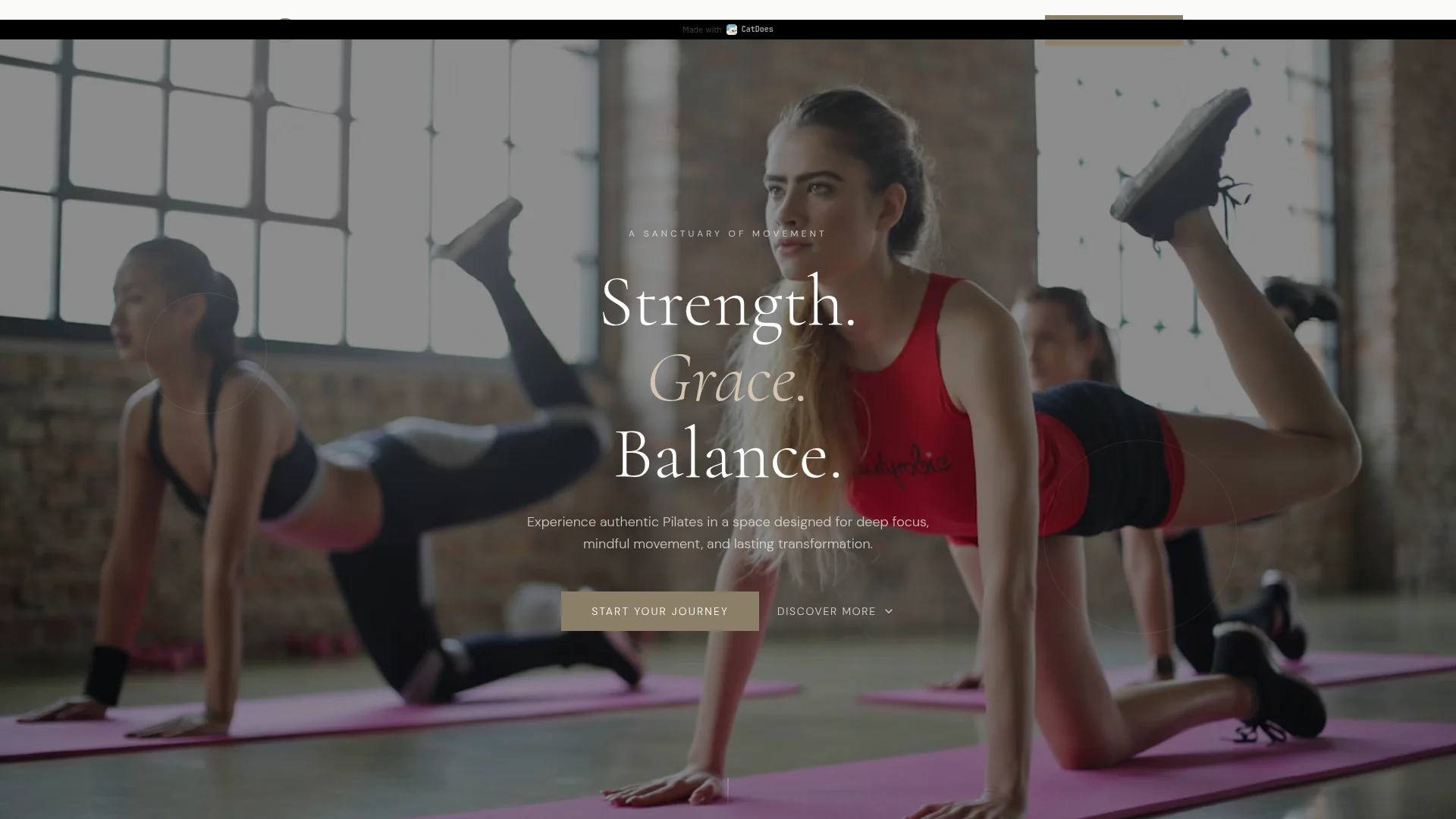
Serene Pilates uses a full-screen video background of a class in session, layered with soft serif italics and a clear "Start Your Journey" primary CTA. The whole thing feels like the Pilates studio version of an Airbnb landing page.
What's worth copying:
A video-first hero performs well for lifestyle and fitness brands where atmosphere sells.
The headline ("Strength. Grace. Balance.") is three words doing the work of three paragraphs.
The subhead names the feeling customers want, not the service: "designed for deep focus, mindful movement, and lasting transformation."
Yoga studios, gyms, dance schools, martial arts dojos, and wellness centers can all mirror this pattern.
4 More Small Business Sites You Can Ship This Weekend
If you're looking for ideas, these four small business types are a natural fit for a CatDoes build:
Neighborhood café or bakery. Hours, menu, location, a gallery of 6 to 8 pastry shots, and an "order online" CTA. Warm cream and brown tones suit the category.
Dental or chiropractic practice. Services, team bios, insurance accepted, and a prominent "Book appointment" button. A trust-forward layout with calm blues works well.
Wedding photographer or videographer. Portfolio grid, package pricing, contact form, and testimonials. Full-bleed imagery sells the work on its own.
Landscaping or cleaning service. Services offered, service area, instant quote form, and a before and after photo slider. Before and after sections convert because they show the result the buyer actually wants.
Pick the one closest to what you actually sell and use the two live examples above as tonal reference.
What You Get With the CatDoes Free Plan
The CatDoes free plan lets you build and publish a first version of your site without putting down a credit card:
15 one-time credits
1 public project
10 checkpoints so you can roll back to any previous version
Web deployment on a free
yourname.catdoes.appsubdomain, with a CatDoes badgeCatDoes Cloud included: 50 MB storage, 25 MB database, 10 auth users, and 500 edge function calls per month
A first build usually takes 5 to 8 credits, which leaves 7 to 10 for edits before you publish. That's enough for a simple, clean site. The two polished examples above took 20 credits each, 5 more than the free plan includes, so for that level of finish, one month of Core (50 credits) covers it with 30 to spare.
Tips to Stretch Your Free Credits

Credit use depends on how much the agent reads and writes on each request, so a few habits keep your burn low:
Write a tight first prompt. Include business type, services, brand vibe (three words), and must-have sections. One good prompt saves 3 to 5 revision credits.
Batch your changes. Instead of asking for "change the button color" and then "change the font," ask for both in one message.
Use checkpoints instead of revisions. If a refinement makes things worse, roll back for free rather than spending another credit to reverse it.
Generate imagery in line. CatDoes can produce hero imagery, section visuals, and placeholder photos inside the same credit budget, so you don't need to pay for external stock sites.
With these habits, a simple one-page site can fit inside the free plan's 15 credits. If you run out, Core's 50 monthly credits leave room to keep improving the site after launch.
Small Business Website SEO: 4 Basics for Launch Day
A new site won't rank on its own. Google's Business Profile help center says local results are mainly based on relevance, distance, and popularity, so your site needs to make it obvious what you do and where you do it.
Claim your Google Business Profile and link it to your site. It's free, and it's what shows up in Google Maps and the local results for searches like "pilates near me."
Put your service and city in the page title and main headline. "Reformer Pilates in Austin" tells Google far more than "Welcome to Serene."
Keep your name, address, and phone number identical everywhere. Your website, your Business Profile, and directory listings should match exactly.
Give each core service its own section or page. A dental practice with separate sections for cleanings, implants, and Invisalign gives Google three clear topics instead of one vague one.
CatDoes handles the technical side: fast pages, mobile layout, meta tags, and semantic headings. For the rest, ask the agent in plain language, for example: "Use 'Reformer Pilates in Austin' as the homepage title and add our address and phone number to the footer."
How Much Does a Small Business Website Cost?
A small business website can cost nothing or tens of thousands of dollars, depending on who builds it. Clutch's 2026 web design pricing guide puts agency projects at $2,000 to $100,000, with most under $10,000. Freelancers who build on Wix, WordPress, or Squarespace charge $25 to $49 an hour.
Option | Typical cost | What you do yourself |
|---|---|---|
Web design agency | $2,000 to $100,000, most under $10,000 | Write the brief, give feedback, supply content, approve rounds |
Freelancer on a website builder | $25 to $49 per hour | Find and manage the freelancer, supply content |
Template website builder | A monthly plan, plus your own hours in the editor | Pick a template, lay out every page, write the copy |
CatDoes | $0 for a first version, $20 per month for Core | Describe the business, review it, ask for changes, publish |
Agencies and freelancers often sell this as a fixed-price "small business website package" that covers a set number of pages. Whichever route you pick, ask what it costs to change a price, a photo, or your opening hours after launch. On CatDoes, that's a short message to the agent, usually 1 to 2 credits.
When to Upgrade (and When You Don't Need To)
You don't need a paid plan if:
You want one simple website and can fit your edits into 15 credits
You're fine with a free
catdoes.appsubdomain and the CatDoes badgeYou don't need code export or GitHub sync
Upgrade to Core ($20 per month for 50 credits) when you want to keep iterating after launch. Upgrade to Starter ($50 per month for 200 credits) when you want to connect a custom domain, remove the CatDoes badge, or ship mobile apps alongside the website.
For most solo small business owners, Core is the sweet spot. Billed yearly it's $17 a month, or $204 a year, which buys roughly 4 to 8 hours of a freelancer's time at Clutch's $25 to $49 hourly rates. If you want to turn that site into a revenue engine, our guide on how to build a website and earn money walks through monetization.
Frequently Asked Questions
Can I create a small business website for free?
Yes. The CatDoes free plan includes 15 one-time credits, which cover a first build and a few rounds of edits, and you can publish the result on a free catdoes.app subdomain. For a more polished site like Maison Éclat or Serene Pilates, which took 20 credits each, plan on one month of Core.
Do I need a domain name to publish my website?
No. Every CatDoes project ships with a free yoursite.catdoes.app subdomain. If you want a custom domain like www.yourbusiness.com, upgrade to Starter.
Do I need separate hosting for my small business website?
No. Hosting is included on every CatDoes plan, including Free. CatDoes deploys the site for you, and CatDoes Cloud adds a database, user accounts, and file storage for things like contact forms and bookings.
How long does it take to build a small business website with CatDoes?
First draft: about 5 minutes. A full, polished site with your real content, photos, and copy: 30 to 60 minutes.
Is the website I build mine to keep?
Yes. You own the content and the brand, and any custom domain you connect stays yours. On the Plus plan and above, you can also export the code to GitHub or download it.
Will my CatDoes website rank on Google?
It can. CatDoes ships fast, mobile-optimized pages with clean HTML, proper meta tags, and semantic headings. Ranking still depends on your content, so give the agent a descriptive brief (services, location, target customer), claim your Google Business Profile, and keep your copy specific to what you actually sell.
Your Small Business Website, Live Today
Getting your business online no longer takes months and an agency invoice. With CatDoes, the first version is live the same afternoon you describe it, and the free plan's 15 credits are enough to get it online. When you want the polish of Maison Éclat or Serene Pilates, one month of Core covers it.
Pick the example closest to your business, write a one-paragraph brief, and start building your small business website on CatDoes before dinner.
Nafis Amiri
Co-Founder of CatDoes


